Meta Description Tips: Templates and Examples That Get Clicks
Doesn't matter if you're an SEO managing a few hundred URLs, a founder banging out your first blog post, or an agency trying to keep client accounts consistent. The goal's the same. Be specific enough to earn the click, and honest enough that people don't bounce the second they land.
Table of Contents
- What Is a Meta Description and Why Does It Still Matter?
- How Long Should a Meta Description Be?
- The Anatomy of a Meta Description That Gets Clicks
- 7 Proven Meta Description Templates (With Fill-in-the-Blank Formulas)
- Real Meta Description Examples by Industry
- How to Write Meta Descriptions for Different Page Types
- Common Meta Description Mistakes to Avoid
- Meta Description Tips for Teams and Agencies at Scale
- FAQ
What Is a Meta Description and Why Does It Still Matter?
A meta description is a short bit of HTML text that lives in a page's `
` and sums up what the page is about, and search engines display it as the little snippet under the blue link. It won't move your rankings the way title tags or backlinks do. What it will do is decide whether someone clicks you or the result above (or below) you.Google's been pretty clear that meta descriptions aren't a ranking factor. But don't read that as "so I can ignore them." Search results are basically a knife fight for attention. Your title tag catches the eye. Your meta description is what closes the deal. And here's the annoying part: Google will often rewrite your description on the fly if it decides yours doesn't match the query well enough. That's exactly why a tight, relevant, query-aware description matters so much. Write a good one, and you cut the odds of Google grabbing some random sentence off your page and slapping it under your title.
If you're publishing at any kind of volume (manually or through automation like RobinRank's AI writing workflow), meta descriptions are honestly one of the best bang-for-buck moves you've got. A five-minute rewrite can genuinely change how a page performs, even with zero movement in the actual rankings.
How Long Should a Meta Description Be?
Aim for somewhere around 120 to 155 characters on desktop, a touch shorter on mobile. There's no hard technical limit, by the way. Google just chops off the display when it runs out of room. And how much room it gives you shifts based on device, query length, and honestly how Google feels like rendering the snippet that day. So treat these numbers as a guideline, not gospel.
Here's a rough breakdown to plan around:
| Context | Practical Length Target | Notes |
|---|---|---|
| Desktop search results | ~150–160 characters | Google may show more or less depending on pixel width, not just character count |
| Mobile search results | ~120–130 characters | Smaller screens truncate sooner |
| Social share previews (Facebook/LinkedIn) | ~150–200 characters | Often pulls the same meta description tag unless Open Graph tags override it |
| Google-rewritten snippets | Variable | Google may pull a different sentence from your page if it judges your description isn't relevant to the query |
My rule of thumb: cram your core message into the first 110 characters so it survives no matter which device chops it off. Then use whatever's left for a secondary detail or a soft nudge to click.
The Anatomy of a Meta Description That Gets Clicks
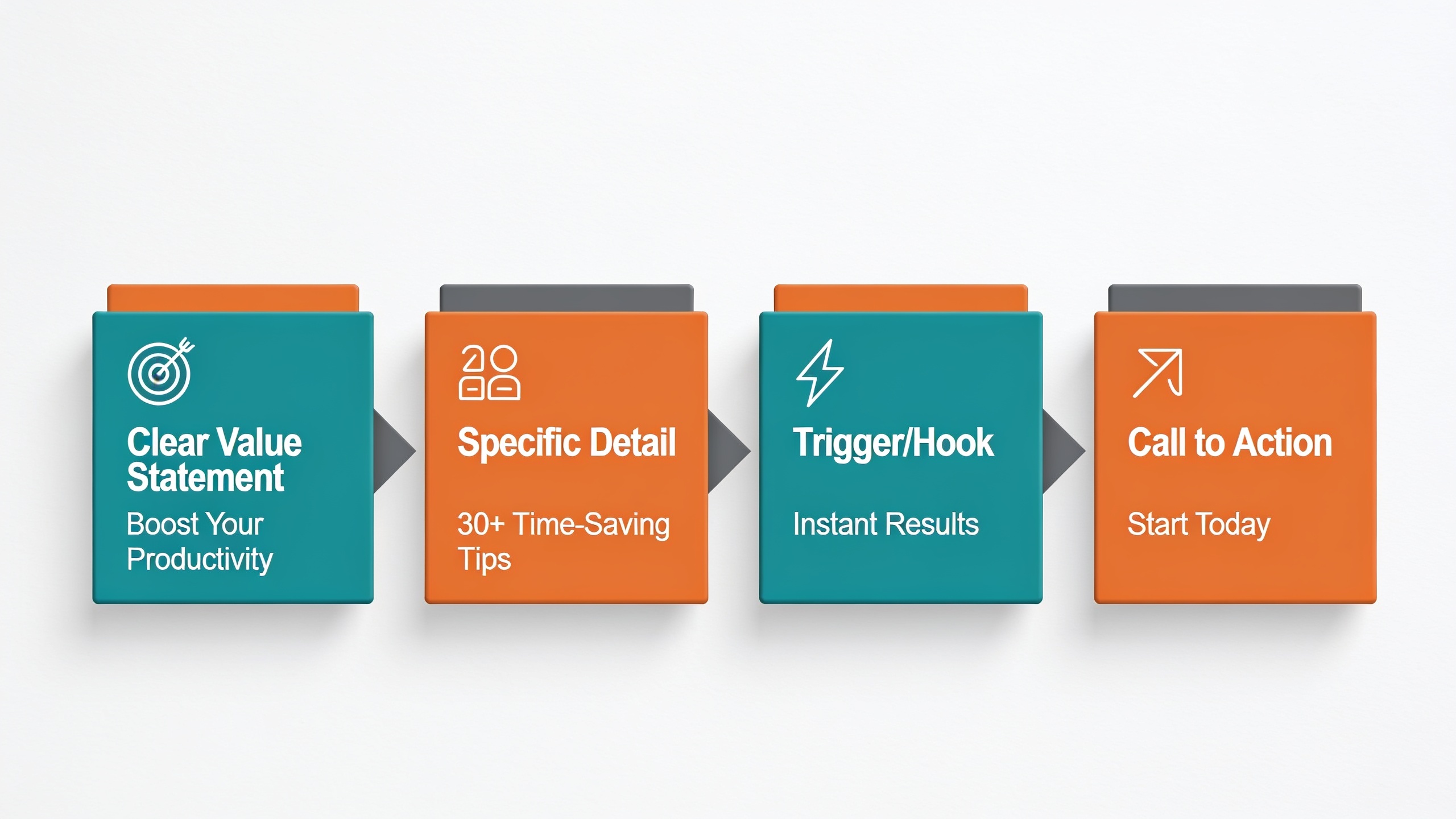
Nearly every meta description that actually works has four things going on: a clear value statement, a specific detail that builds a little trust, some kind of emotional or practical hook, and a call to action. Drop any one of those and you usually end up with a bland snippet that just... disappears into the results page.
A clear value statement. Tell the searcher exactly what they get, in plain English. Don't describe your company. Describe what happens for the reader.
A specific, concrete detail. Numbers, timeframes, named specifics (a template count, a year, a step count) make a description feel real. "Learn tips" is vapor. "7 templates and 12 real examples" is something you can picture.
A trigger. This is the psychological nudge. Curiosity, urgency, or relief from some nagging problem. It's the gap between "a guide about email marketing" and "avoid the 3 mistakes killing your open rates." Guess which one I'm clicking.
A call to action. Short verbs, "See," "Get," "Compare," "Download," "Learn how." They tell the brain what to do next. Small thing, but it works, because people scan results fast and a directive verb grabs the eye.
Put those four together and you've basically got the skeleton of every meta description worth writing. They also map straight onto the templates coming up next.
7 Proven Meta Description Templates (With Fill-in-the-Blank Formulas)
Think of these as skeletons, not scripts. Swap in your own specifics and trim to fit the character count. The whole point of working from a template is to keep the proven structure while making the details unmistakably yours.
1. The Direct Benefit Formula
`[Verb] [specific outcome] with [product/method]. [Supporting detail]. [CTA].`
Example: "Grow organic traffic without hiring a content team. RobinRank writes, optimizes, and publishes SEO articles on autopilot. Start free."
2. The Problem-Solution Formula
`Struggling with [problem]? [Solution] helps you [outcome] in [timeframe/detail].`
Example: "Struggling to rank without backlinks? RobinRank matches your site with a verified backlink network so links are earned, not bought."
3. The Listicle Preview Formula
`[Number] [topic] to [outcome]. Includes [specific detail 1] and [specific detail 2].`
Example: "9 meta description templates to boost click-through rate. Includes real examples for SaaS, ecommerce, and local business pages."
4. The Question-Answer Formula
`[Question searchers ask]? [Short direct answer], plus [added value].`
Example: "How long should a meta description be? Aim for 120–155 characters — see templates and real examples that fit the limit."
5. The Authority/Data Formula
`[Credible detail or data point] on [topic]. [What the reader gets]. [CTA].`
Example: "A practical breakdown of how Google displays and rewrites meta descriptions. See templates you can copy today."
6. The Comparison Formula
`Comparing [Option A] vs [Option B]? See [specific angle] before you decide.`
Example: "Comparing manual SEO writing vs AI content automation? See what changes for speed, cost, and editorial control."
7. The Urgency/Timeliness Formula
`[Timely angle] for [year/season]. [Specific benefit]. [CTA].`
Example: "Meta description best practices for 2025 search results. Updated templates, character limits, and examples inside."
Real Meta Description Examples by Industry
Formulas are one thing, but seeing them applied to actual business types makes them way easier to steal. These are illustrative, written to show structure, tone, and length, not lifted from any live search result.
SaaS / Software
"Automate your SEO content pipeline in minutes. RobinRank plans, writes, and publishes articles that earn verified backlinks. Get started free."
Ecommerce Product Page
"Waterproof hiking boots built for 500+ miles of trail use. Free returns, 2-year warranty. Shop sizes 6–13 now."
Local Service Business
"Same-day plumbing repairs in Austin, TX. Licensed, insured, and rated 4.8 stars by 300+ local customers. Call for a free quote."
B2B Consulting
"Cut customer churn by identifying at-risk accounts before they cancel. See the 3-step framework our clients use to retain revenue."
Blog / Editorial Content
"7 meta description templates with real examples for SaaS, ecommerce, and local pages. Copy, adapt, and boost your click-through rate today."
Nonprofit
"Every $25 donated provides clean water access to one family for a year. See how your gift is tracked and where it goes."
Notice something? Not one of these leads with the company. They lead with the outcome or the detail the reader actually cares about, and then let the brand or the CTA wrap things up. That order matters more than people think.
Want content like this running on autopilot for your own site? Try RobinRank free — AI-written, SEO-optimized articles generated and published automatically, no credit card required.
How to Write Meta Descriptions for Different Page Types
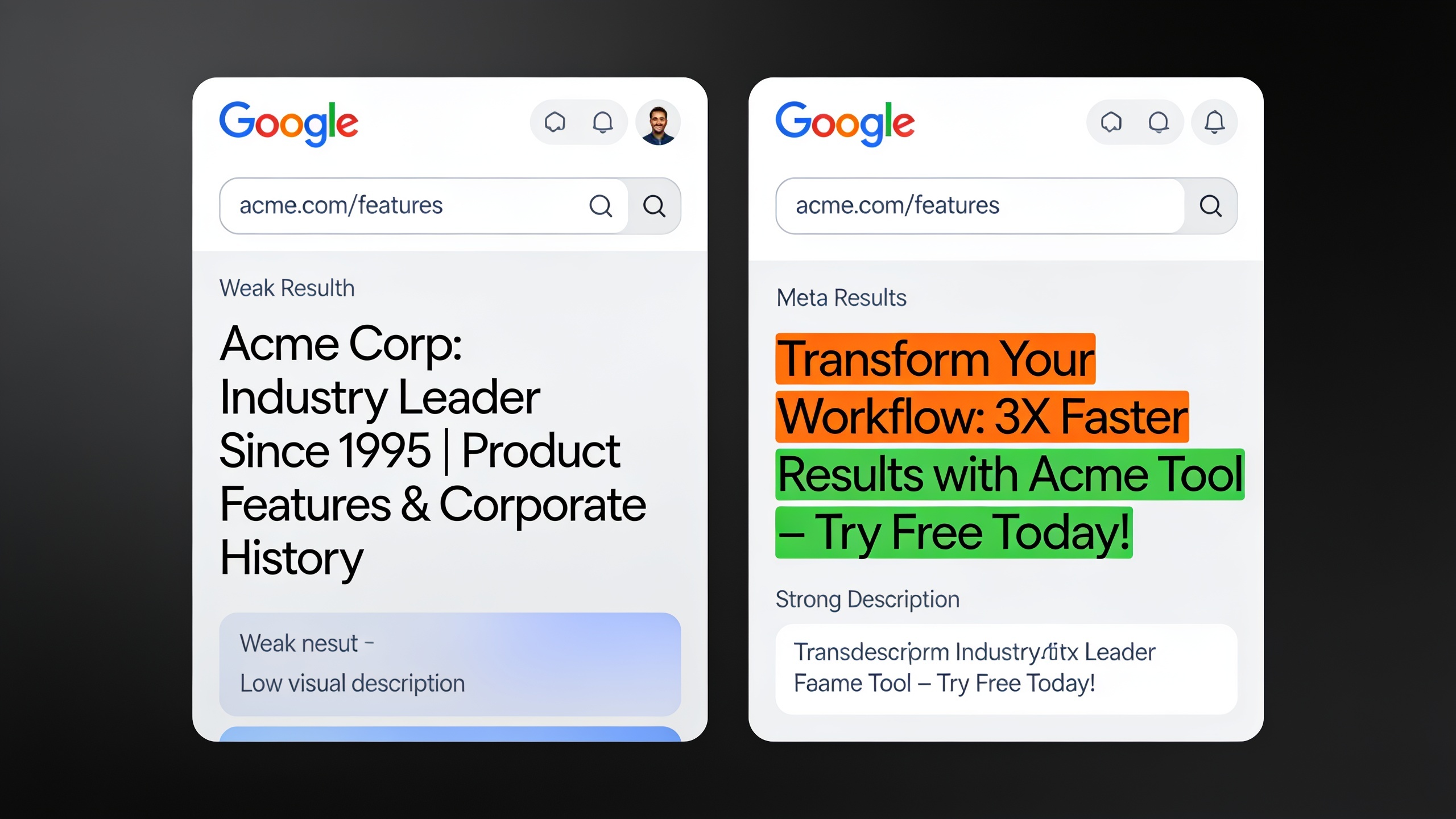
Different pages compete for attention in totally different ways, which is why a one-size-fits-all formula tends to fall flat. Matching the format to the page's intent is probably the single most overlooked tip in most SEO checklists, and it's an easy win.
Homepage
Your homepage description is often the first summary of your whole brand a searcher sees, so it has to answer "what does this company do, and who's it for?" in one sentence, then land on a proof point or CTA. Skip the fuzzy mission-statement stuff. Be concrete about the mechanism, not just the dream.
Blog Posts and Guides
Blog descriptions should preview the actual goods inside, a number of tips, a named framework, the exact question you're answering. Not some limp "learn more about X" line. If your article's got templates, examples, or data, say so. That's a real reason to click you over a competitor who only promises "tips."
Product and Service Pages
These convert best when you lead with something tangible. Price range, material, turnaround time, a guarantee. Commercial searchers are comparing options fast and they want differentiators, not adjectives like "high-quality" or "best-in-class" (which, let's be honest, everyone claims and nobody believes).
Category and Landing Pages
Category pages do well when you describe the breadth of what's inside. "50+ styles," "filter by size, color, and brand," that sort of thing. The searcher's usually still browsing here, not locked onto one specific item, so give them a sense of scale.
Internal Linking Hub Pages
If a page works as a hub, linking out to a bunch of related articles or resources, the description should signal that breadth so people know they're landing on a proper resource, not a single narrow answer. And this is where good internal structure pays off way beyond the meta description itself. Pages that are well-connected through a clear linking setup tend to get indexed and understood faster, which is something I dug into over in this guide to internal linking for SEO success.
Common Meta Description Mistakes to Avoid
Most underperforming descriptions flop for one of a handful of predictable reasons. And the fix is almost always a five-minute edit, not some agonizing rewrite.
Being vague instead of specific. "We offer the best solutions for your business needs" tells the searcher exactly nothing. Swap the abstractions for a concrete outcome, a number, a named feature.
Keyword stuffing. Cramming your target keyword in three times across 150 characters reads like spam to a human and does zilch for rankings, since meta descriptions aren't a ranking factor anyway. Use it once, naturally, ideally near the front. Done.
Duplicating the title tag. If your title and description basically say the same thing with different words, you've thrown away free real estate. Use the description to add a detail the title couldn't fit.
Writing it as an afterthought. A ton of CMSs default to auto-generating the description from your first sentence, and that snippet almost never matches what a searcher actually wants to know before clicking. Write it on purpose, after the content's done, so it reflects the real value inside.
Ignoring search intent. A description written for someone doing early research reads weird to someone with a credit card in hand, and vice versa. Match the tone and the CTA to wherever the searcher probably is in their journey.
Letting it run too long and get chopped mid-sentence. A snippet cut off at "...and how to fix" looks broken and kills trust. Front-load the message that matters.
Promising something the page doesn't deliver. Say "12 templates," have 6, and your bounce rate spikes while whatever CTR bump you got evaporates the second people leave. Accuracy protects your long-term numbers, not just the click. Don't write checks the page can't cash.
Meta Description Tips for Teams and Agencies at Scale
Writing one great meta description is easy. Writing a few hundred consistently good ones across a whole content calendar? That's where most teams quietly fall apart. The fix is a repeatable process, not hoping every writer remembers best practices on a Tuesday afternoon.
Start by building a template library, not a rulebook. Hand writers 5 to 7 approved formulas (like the ones above) instead of a wall of abstract rules nobody reads. Templates are faster to apply and way easier to audit later.
Set a character-count guardrail somewhere in your CMS or style guide. Even a simple visual counter flagging 155 characters catches truncation before publish instead of after, when you're staring at a half-finished snippet in the wild.
Then audit what you've already got, in batches. Pull your top 50 organic-traffic pages by impressions with low click-through rate from Google Search Console and rewrite those first. That's where the return on a rewrite is highest, no question.
Here's where AI-assisted workflows genuinely earn their keep, honestly. Platforms like RobinRank generate SEO-optimized titles and meta descriptions as part of the article draft itself, right alongside internal links and schema markup, so your starting point is already built for search instead of scraped from some random paragraph. Everything stays fully editable before it goes live, which matters, because tone and specificity still deserve a human pass, especially on the competitive commercial pages where the click is worth real money.
And track performance instead of trusting your gut. Click-through rate by page in Search Console is about the closest thing you've got to knowing whether a description is actually working. Run a swap test: change the description, wait a few weeks, compare the CTR. Cheap way to find out which formulas actually move the needle for your audience, not some blog's audience.
| Approach | Speed | Consistency Across Pages | Best Fit |
|---|---|---|---|
| Manual, case-by-case writing | Slow | Variable, depends on writer | Small sites, high-value pages, one-off landing pages |
| Style guide + templates | Moderate | High | Mid-size teams publishing weekly |
| AI-assisted draft + human review | Fast | High | Agencies and teams publishing at volume across many client sites |
FAQ
Do meta descriptions actually affect my rankings?
Nope. Google's said flat out they're not a direct ranking factor. Their real job is click-through rate. A compelling description can pull more clicks at the exact same ranking position, and click behavior over time can loosely correlate with how a page does in search. So no direct effect, but not nothing.
Why does Google keep rewriting my meta description?
Because its systems decided yours doesn't closely match what the searcher typed, or it found a sentence elsewhere on your page that fits the query better. The fix is writing a description that's specific, accurate, and tightly tied to your page's main topic. That won't stop it entirely, but it cuts the odds a lot.
Does every single page really need its own unique description?
Yes. Duplicate descriptions across pages give searchers (and Google) no way to tell your results apart, which drags down CTR and makes Google more likely to just write its own snippet. Even if you're working from templates, swap in page-specific details every time. No exceptions.
How many keywords should I stuff in there?
One. Placed naturally, near the front. Since descriptions aren't a ranking factor, repeating a keyword does absolutely nothing for SEO and mostly just makes your copy read like spam, which quietly kills clicks.
Can I reuse the meta description for social sharing?
Usually, yeah, since a lot of platforms default to pulling the meta description tag when there's no Open Graph or Twitter Card set. That said, dedicated `og:description` tags let you tailor the message for social specifically, which is worth the extra minute for any page you expect to get shared a lot.
Putting It Into Practice
Meta descriptions are a tiny scrap of HTML with a wildly outsized effect on how many of your rankings actually turn into real visits. And the teams that keep winning the click? They're not the ones with the cleverest wordplay. They're the ones with a boring, repeatable process. Pick a template that fits the page type, fill it with a genuinely specific detail, keep it under about 155 characters, and check Search Console often enough to know what's landing.
So start with your highest-impression, lowest-CTR pages. Apply one of the formulas above. Give it a few weeks to show up in the data before you move to the next batch. That's it. Not glamorous, but it works.
Ready to stop writing content by hand? Start your free RobinRank trial and get a full month of SEO-optimized articles published on autopilot.