The Ultimate Guide to Internal Linking for SEO Success

Internal linking is easily the most slept-on lever in SEO, and I think it's slept-on precisely because it's so easy to control. There's no pitching, no begging some editor for a link, no waiting around. You're just organizing what you already own. It costs nothing but a bit of your time.
So let's get into how internal links actually pass authority around a site, why they matter for getting your pages crawled and indexed, and how to build a system you'll actually stick with.
Table of Contents
- What Is Internal Linking and Why Does It Matter for SEO?
- How Does Internal Linking Affect Crawlability and Indexing?
- How Internal Links Distribute Authority Across a Site
- Building an Internal Linking Strategy Step by Step
- Internal Linking Models: Which Structure Fits Your Site?
- Internal Linking vs. External Link Building: How They Work Together
- Common Internal Linking Mistakes That Hurt SEO
- Tools and Automation for Internal Link Building
- Frequently Asked Questions
What Is Internal Linking and Why Does It Matter for SEO?
An internal link is just a hyperlink connecting one page on your site to another page on the same site. A strategy is when you place those links on purpose instead of scattering them wherever they happen to land. It matters because internal links are how both Google's crawlers and actual humans find their way around, figure out what's connected to what, and decide which pages seem important.
Google's own Search Central docs have said for years that a sensible internal link structure helps them understand which content matters on a site and how everything relates. Skip the internal links and you end up with orphan pages. That's a page with zero incoming links from anywhere else on your own site. Nobody can find it. Not Google, not a curious reader clicking around. It just sits there.
When internal linking is working, it's quietly doing three jobs at once. It gives crawlers a trail to follow so new stuff gets discovered faster. It tells search engines "hey, these pages are about the same thing" by connecting related content. And it hands off ranking juice (call it link equity, internal PageRank, whatever you like) from your strong pages to your weaker ones.
For anyone managing a blog with dozens or hundreds of posts, this is the part that really matters. Internal links are the thread that turns a random heap of articles into something that reads like an actual library of expertise. And Google, along with the AI answer engines that keep getting more attention, can only understand that expertise if the connections are actually there.
How Does Internal Linking Affect Crawlability and Indexing?
Internal linking hits crawlability head-on, because search bots mostly find pages by following links. A page nothing links to is a page that probably won't get crawled or indexed anytime soon. Crawlability, if you haven't run into the term, is just how easily those automated bots can move through your pages.
Crawl Depth and Click Distance
Crawl depth (some people say click depth) is how many clicks it takes to get from your homepage to a given page. Bury something five or six clicks deep and Google crawls it way less often than a page sitting two or three clicks out. Crawlers only have so much budget per site, so they go for the easy-to-reach stuff first. A good internal linking setup pulls your important pages closer, through nav menus, hub pages, and links dropped into your higher-authority content.
Orphan Pages and Wasted Content
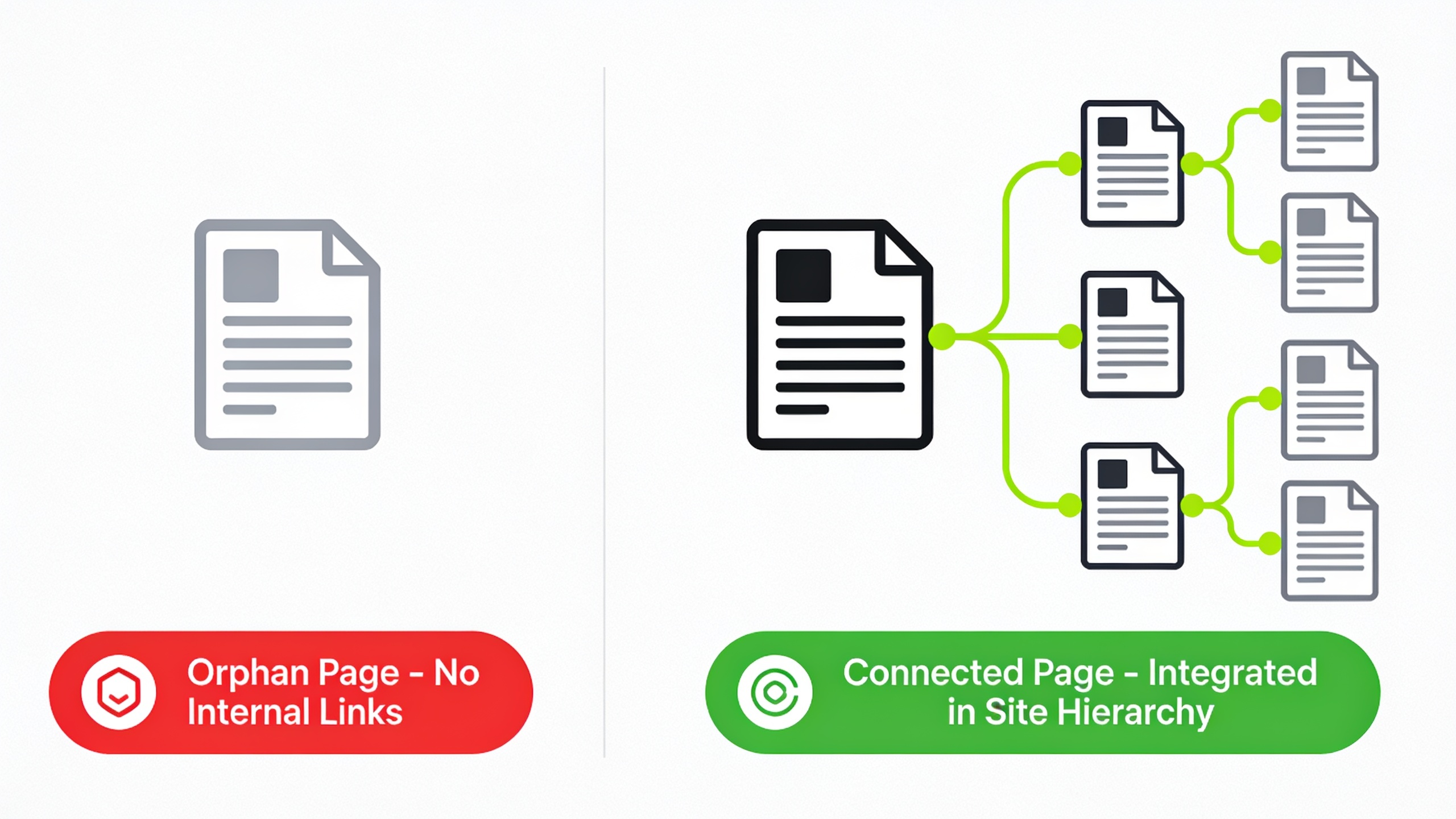
Here's a thing that trips people up: an orphan page can technically be in your XML sitemap and still be invisible, because search engines mostly follow the link graph through your site, and if nothing points to that page, there's no path to follow. Teams that publish a lot (agencies, in-house marketers running busy blogs, you know who you are) rack these up constantly. Old posts get buried under new ones and nobody ever circles back to link them.
Practical Crawlability Fixes
The fixes aren't complicated. Link every new article from at least one relevant existing page within a week of hitting publish, don't let it float around unconnected. Keep a hub page (a pillar page, a resource category, something like that) that links out to all its related subtopics. Use breadcrumbs so every single page has at least one structural link back into the hierarchy. And run an orphan-page audit every so often with a crawler tool or the "Pages" report in Google Search Console, which is pretty good at flagging indexed pages that basically nobody links to internally.
How Internal Links Distribute Authority Across a Site
Internal links move authority around by passing a slice of one page's ranking signals to whatever it links to. This goes all the way back to the original PageRank model Google was built on. Practically speaking, a page that's earned solid backlinks from other sites can share some of that clout with your related internal pages, just through contextual links.
That's why SEO folks keep talking about "link equity flow." Think of a page with lots of external backlinks as a reservoir. The internal links coming out of it are the channels carrying some of that water off to other pages. Pages that get linked to from a bunch of authoritative internal pages end up easier for everyone, users and search engines both, to find and take seriously.
And this is exactly where internal linking bumps into external link building. Say you land a great backlink to your homepage or your cornerstone guide. If you then link from that page to newer, related articles, you're spreading the authority inward instead of letting it pool on one URL doing nothing. That's basically the whole logic behind community-driven approaches like the one laid out in The Ultimate Guide to Natural Backlink Exchange Networks. External links bring the authority in; internal links decide where it goes once it's there.
Anchor Text and Context
The actual words you use in a link (the anchor text) tell search engines what the destination page is about. So descriptive, keyword-relevant anchors do real work. Linking the phrase "internal link building" to a page about, well, internal link building reinforces the topic way better than a lazy "click here" or "read more." Those generic anchors tell Google nothing. Honestly, they're a wasted opportunity every time.
Building an Internal Linking Strategy Step by Step
A working strategy starts with a content inventory, runs through a mapping process where you figure out which pages should support which, and finishes with an ongoing habit. It's not a thing you knock out once and cross off the list forever. I wish it were, but no.
Step 1: Audit Your Existing Content
Before you add a single link, get the full picture of what you've already got. Export every indexed URL (Search Console or a crawler will do it) and sort them by topic, funnel stage, and how many internal links each one currently has. This one step tends to shake loose all your orphan pages, your over-linked pages, and the obvious topic clusters that somehow never got connected.
Step 2: Identify Pillar and Supporting Content
Pillar pages are your big, comprehensive pieces built to rank for broad, high-volume terms. Supporting pages cover the narrower subtopics that feed traffic and authority back up to the pillar. Once your inventory's mapped, group related articles into clusters around a central pillar, then plan the links so that every supporting article links up to its pillar at least once, the pillar links back down to its most relevant supporting pieces, and articles in the same cluster link sideways to each other when it genuinely makes sense. That last "when it genuinely makes sense" is doing a lot of work, by the way. Don't force it.
Step 3: Prioritize High-Authority Pages as Link Sources
Figure out which pages already pull the most organic traffic or hold the most external backlinks, because those are the ones with authority to give away. Dropping a few contextual links from those winners over to your newer or struggling pages is honestly the fastest visibility boost you'll find that doesn't involve waiting around for fresh backlinks.
Step 4: Write Contextual, Natural Anchor Text
Want content like this running on autopilot for your own site? Try RobinRank free — AI-written, SEO-optimized articles generated and published automatically, no credit card required.
Every internal link should read like it belongs in the sentence, with anchor text that actually describes where it's going. So in a piece about link acquisition tactics, you might write a sentence explaining How Backlink Exchange Networks Actually Work and how outbound and inbound link credits get matched up. See how the link is part of the sentence, not bolted onto the end like an afterthought? That's the goal.
Step 5: Set a Maintenance Cadence
Internal linking is not set-it-and-forget-it. Every time you publish something new, go back and add links to it from two or three older, relevant pages, and check whether the new piece should point up at any pillar content. The teams that actually keep this up are the ones who baked it into their editorial checklist, so it just happens instead of getting shrugged off.
Internal Linking Models: Which Structure Fits Your Site?
There's no single "right" internal linking structure. What works depends on how big your site is, how your content's organized, and how deep your archive runs. Here's how the three most common approaches stack up.
| Structure | Best For | How It Works | Main Limitation |
|---|---|---|---|
| Hub-and-spoke (pillar/cluster) | Content-heavy blogs, SEO-driven sites | A central pillar page links out to supporting articles, which link back to the pillar and to each other | Requires ongoing maintenance as clusters grow |
| Flat/silo structure | Small business sites, service pages | Pages are grouped into strict topical silos with minimal cross-linking between unrelated silos | Can limit link equity flow between genuinely related topics |
| Chronological/blog-only linking | New blogs with limited content volume | Newest posts link to a handful of recent or popular past posts | Older, still-relevant posts get buried and under-linked over time |
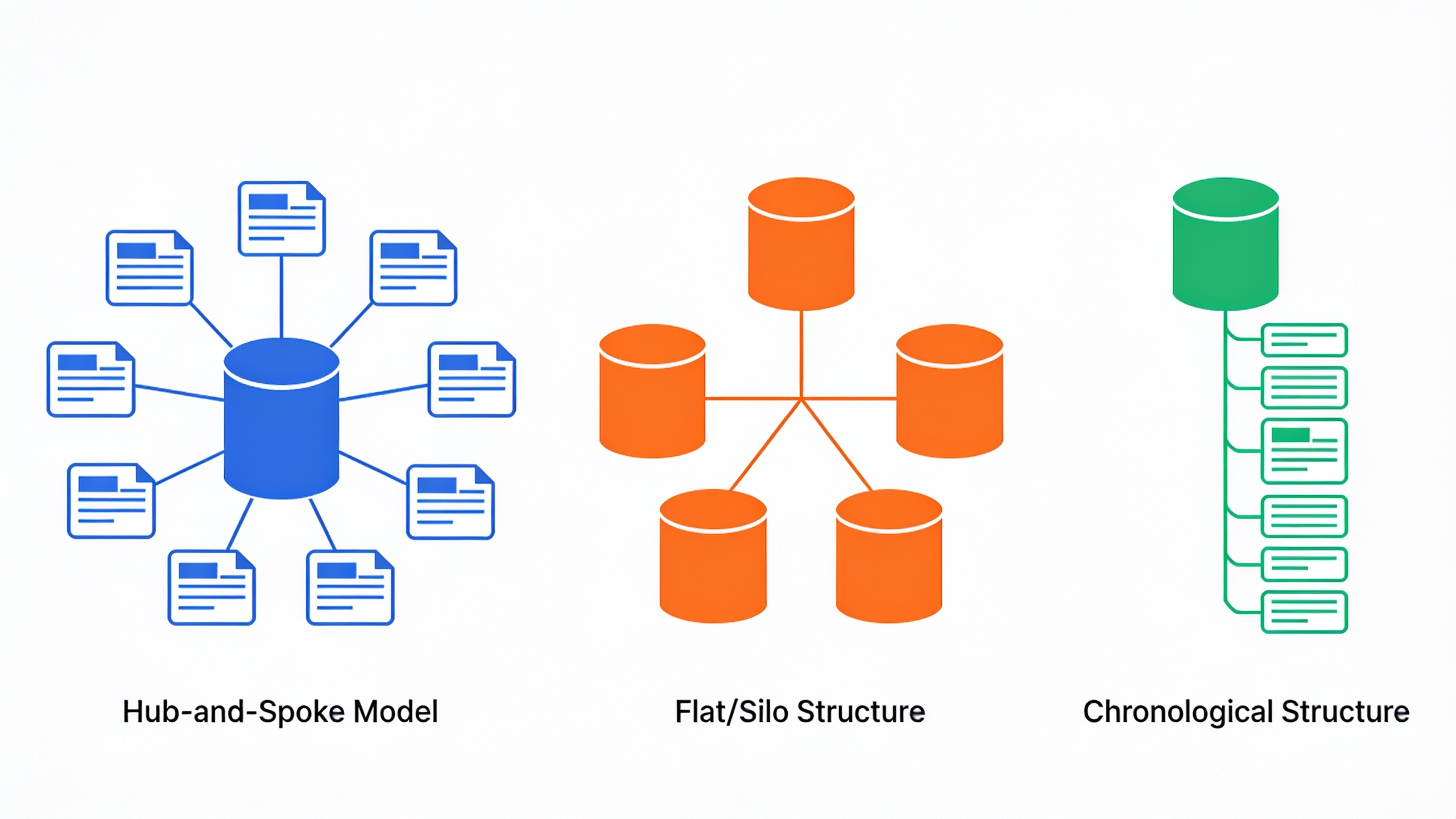
Most serious content programs drift toward the hub-and-spoke model eventually, and for good reason. It scales, and it mirrors how search engines already think, grouping related stuff into a recognizable topic cluster instead of treating every post like a lonely island.
Internal Linking vs. External Link Building: How They Work Together
Internal linking and external link building aren't rivals. They're two halves of the same machine. Backlinks pull authority into your site from the outside, and internal links decide how that authority gets shared once it's inside. Treating them as two unrelated boxes to tick is one of the more common strategic blunders I see SEO teams make.
Picture the classic setup. A company earns a killer backlink to its homepage from some industry publication. Great. But if that homepage doesn't link out to the relevant service pages or blog content, most of that inbound authority just sits there, stuck on one URL, going nowhere. A deliberate internal linking plan makes sure your authority-rich pages (homepages, cornerstone guides, anything that just picked up new backlinks) are actively passing that value along to the pages that could use a lift.
This is exactly why the platforms focused on link building keep treating internal linking as a partner practice rather than a footnote. If you're looking into structured ways to earn backlinks, say through community-based exchange models instead of grinding out manual outreach, pair it with a real internal linking plan. Otherwise those shiny new backlinks just park themselves on one page and never strengthen the rest of the site.
Common Internal Linking Mistakes That Hurt SEO
The worst internal linking mistakes are almost always sins of neglect, not sabotage. Pages nobody ever links to. Links all crammed onto the same two or three URLs. Anchor text that tells Google absolutely nothing. Let's go through the big ones.
Mistake 1: Over-Linking to the Same Pages
If every article dutifully links to the homepage and your one or two flagship posts, those pages hoard all the internal authority while everything else starves. Spread your links around your whole content inventory on purpose. Stop defaulting to the same handful of destinations out of habit.
Mistake 2: Generic Anchor Text
"Click here." "This article." "Learn more." These communicate nothing about what's on the other side of the link. A descriptive anchor that reflects the target page's actual keyword or topic does far more with the exact same link. Same effort, way more payoff.
Mistake 3: Ignoring Orphan Pages
A page that's in your sitemap but has zero internal links is basically invisible within your own link graph. For an active blog, audit at least quarterly and specifically hunt for pages with no inbound internal links. They hide well.
Mistake 4: Linking Only Downward, Never Upward
Loads of sites link from pillar pages down to their supporting content and then just... forget to link the supporting content back up, or sideways to sibling articles. That one-way street chokes off how much authority circulates back to the pages you actually want ranking for the competitive, high-value terms. It's a small oversight with a real cost.
Mistake 5: Treating Internal Links as a One-Time Setup Task
Sites are moving targets. New posts go up, old ones get refreshed, priorities shift around. An internal linking strategy you set up once and never touch again slowly drifts out of step with what your site actually needs. Revisit it or watch it rot.
Tools and Automation for Internal Link Building
Managing internal links by hand across a big content library is a slog, which is why a lot of SEO teams now lean on tools that either surface link opportunities or handle the whole thing right inside the publishing flow. Automation fits internal linking especially well because the core job (match relevant pages, drop in contextual links) is repetitive and rules-based. It's exactly the kind of thing you don't want to be doing manually at 11pm.
Per RobinRank's own product description, the platform writes SEO-optimized articles with natural internal and external links baked in during drafting, plus SEO titles, meta descriptions, and auto-generated schema markup, then publishes straight to a connected CMS like WordPress. For teams shipping content on a schedule, that means internal linking gets handled while the writing happens, not as some separate audit you dread doing three months later.
Tool or spreadsheet, doesn't matter. The fundamentals don't change. Know your full content inventory, know which pages carry the most authority, and connect every new page to the rest of the site before it goes live, not months down the road when you've already forgotten it exists.
Frequently Asked Questions
How many internal links should a page have?
There's no magic number, but most well-optimized long-form articles land somewhere between 3 and 8 contextual internal links, depending on length and how many genuinely relevant pages you've actually got to link to. The right count is however many are useful to the reader and on-topic. Stuffing a page with irrelevant links just to hit some quota waters down every link on the page. Don't do it.
Do internal links actually help rankings, or just navigation?
Both, honestly. They help people get around your site, sure, but they also help search engines map out how pages relate and spread authority signals across your domain. That's why Google's Search Central guidance flat-out recommends a logical internal link structure as part of technical SEO. Sites with clean internal linking tend to have fewer orphan pages and get new content indexed faster.
What's the difference between internal linking and internal link building?
"Internal linking" is the general act of linking between pages on the same site. "Internal link building" is the more deliberate, systematic version: auditing your content, mapping clusters, actively adding links to prop up specific pages. Same spirit as external link building being a real strategy rather than something that just happens to you when you publish.
Should every blog post link back to the homepage?
Nope. Homepages usually rack up plenty of internal links through your main navigation anyway, so your posts are often better off pointing at relevant category pages, pillar content, or related articles instead of reflexively linking home every single time.
How often should I audit my internal linking structure?
For active sites publishing weekly or more, a quarterly audit is a solid baseline for catching orphan pages, broken links, and clusters that ballooned without enough cross-linking. Publishing less often? Twice a year is usually fine and you won't lose much.
Internal linking is never going to grab headlines the way a viral backlink or a big algorithm shakeup does. But it's one of the very few SEO levers you control completely, start to finish, no permission required. And getting it right doesn't demand new tools or new content. It just needs a clear map of what you already have, plus the discipline to connect it on purpose every time you hit publish.
Ready to stop writing content by hand? Start your free RobinRank trial and get a full month of SEO-optimized articles published on autopilot.