Content Decay: Why Your Best Articles Stop Ranking

You know that feeling when you open your analytics and traffic isn't crashing, exactly, but it's been leaking for months? That slow bleed? Yeah. That's usually content decay doing its thing. Below I'll walk through what actually causes it, how to catch it before it starts costing you real money, and a framework I use for reviving old articles that have started to fade.
Table of Contents
- What Is Content Decay?
- Why Does Content Decay Happen?
- How Do You Know If Content Decay Is Causing Your Declining Organic Traffic?
- The Content Refresh Framework: How to Fix Decaying Articles
- How Often Should You Audit Content for Decay?
- Common Mistakes That Accelerate Content Decay
- What Happens When You Refresh Content the Right Way
- FAQ
What Is Content Decay?
Content decay is the slow process where a published page loses search visibility, click-through rate, and organic traffic over time, even when you haven't touched a single word of it. It's not a penalty. And it's almost never one dramatic event. It's the cumulative result of your page standing perfectly still while the search world around it keeps shuffling forward.
Think of it like a shop on a busy street. Opening day, your window display is fresh and everyone stops to look. Fast forward a year: your neighbors have all redecorated, the crowds now walk a different route, and your window looks exactly the same as it did on day one. Nothing broke. You just fell behind everyone else.
In SEO terms, decay usually shows up as a gradual slide in your average keyword position over several months, with impressions and clicks slowly dropping off in Google Search Console. Sometimes your ranking holds steady but your click-through rate still falls, and that's almost always because a competitor's title or a featured snippet is now more tempting than yours. You might also see people spending less time on the page or bouncing faster, because the content just feels a little dated to them.

The thing to understand is that this is different from a sudden traffic crash. A manual penalty, a broken deployment, a big algorithm update, those hit hard and fast and usually across your whole site. Decay is quiet, gradual, and specific to individual pages. Which is exactly why most people miss it until the losses have piled up into something ugly.
Why Does Content Decay Happen?
Content decay happens because search engines are constantly re-scoring relevance, freshness, and competitive strength for every query, and a page that never changes inevitably slips behind a landscape that never stops. There's rarely one culprit. It's usually a few things ganging up on your article at the same time.
Algorithm Updates and Shifting Ranking Factors
Google pushes core updates several times a year, and each one quietly reshuffles how much it cares about things like depth, expertise, and whether people actually got what they came for. An article you optimized for the signals of two or three years ago might just not fit what the algorithm rewards today, even if every word of advice in it is still technically correct.
Competitor Content Refreshes
Your competitors are not standing still, and honestly, this is the one that gets people most often. Some rival publishes a fatter, cleaner, better-formatted version of your exact topic with fresher examples and a video embedded, and Google has every reason in the world to bump their newer page above yours. Doesn't matter that you were first. First doesn't count for much anymore.
Outdated Facts, Statistics, and Dead Links
Nothing screams "this page is old" faster than a stat from five years ago, a shout-out to some tool that shut down in 2021, or a link that now dumps you onto a 404. These little things chip away at your trust signals, and they can suppress rankings even when the core of the article still holds up fine.
Search Intent Drift
The way people search for something shifts over time, and your content can't feel it happening. A query that used to bring up straightforward how-to articles might now surface product comparisons, or video, or an AI Overview eating the whole top of the page. If you built your article for the old intent, it loses relevance without a single word changing on it.
Technical and On-Page Erosion
And then there's the boring stuff. Site migrations, theme swaps, plugin updates, CMS changes, all of these can quietly introduce broken internal links, slower load times, or missing schema that pile up and drag your rankings down over months. A lot of this traces back to the same root problems covered in 5 Content Marketing Mistakes That Are Quietly Wrecking Your SEO, which digs into the habits that sabotage content long before decay becomes obvious.
How Do You Know If Content Decay Is Causing Your Declining Organic Traffic?
You confirm content decay by looking at a page's performance over a rolling 12-month window in Google Search Console and Analytics, and finding a steady downward slope in impressions, clicks, or average position that's isolated to specific URLs instead of your whole site. That last part matters. Traffic dropping site-wide is a different problem. Decay is page-level, and you have to isolate the pattern to be sure.
Start with the Performance report in Search Console, filtered by page, and don't look at a 28-day snapshot, because decay is a slow trend and a short window will just confuse you. What you're hunting for is a consistent slide in impressions on a URL, which usually means the page is losing keyword rankings rather than just losing clicks. Watch for average position drifting from, say, 4 down to 11 across a few months. And keep an eye on that CTR-dropping-while-position-holds situation, because that almost always means a competitor's result (or some shiny new SERP feature) is stealing the click that used to be yours.
Over in Analytics, segment by landing page and compare sessions year over year or quarter over quarter. Decaying articles tend to follow this bell-curve shape: a ramp-up after publishing, a peak a few months later once the page is fully indexed and has picked up some backlinks, and then a long, gentle tail-off. The whole point of auditing is to catch that tail-off early, while the page still has enough leftover authority to bounce back quickly from a refresh.
Honestly, one simple monthly habit does most of the work here. Just sort your top 50 landing pages by year-over-year traffic change. That's usually enough to surface the five or ten articles quietly hemorrhaging the most ground before the loss gets bad enough to hurt.
The Content Refresh Framework: How to Fix Decaying Articles
Fixing content decay comes down to matching your effort to the size of the problem, because not every fading article needs a full rewrite, and treating them all identically wastes your time and can actually backfire if you go tearing apart a page that only needed a tiny tune-up. The table below splits refresh work into four tiers based on how far a page has fallen and how much ground it needs to claw back.
| Refresh Type | When to Use It | Typical Effort | What It Involves |
|---|---|---|---|
| Light refresh | Minor ranking slip (1-5 positions), a few outdated stats or dead links | Low (1-2 hours) | Update dates, fix broken links, swap outdated stats, refresh meta title/description |
| Deep refresh | Significant drop (6+ positions) or clear loss to more comprehensive competitor content | Medium-high (half day to full day) | Rewrite intro, expand thin sections, add new subheadings, update examples, add original data or visuals |
| Consolidation | Multiple aging articles competing for the same keyword and cannibalizing each other | Medium | Merge overlapping posts into one authoritative page, 301-redirect the weaker URLs |
| Retire or redirect | Topic no longer relevant, or traffic potential is permanently gone (e.g., discontinued product, outdated regulation) | Low | Redirect to a more relevant live page or remove and let search engines drop it cleanly |
Want content like this running on autopilot for your own site? Try RobinRank free — AI-written, SEO-optimized articles generated and published automatically, no credit card required.
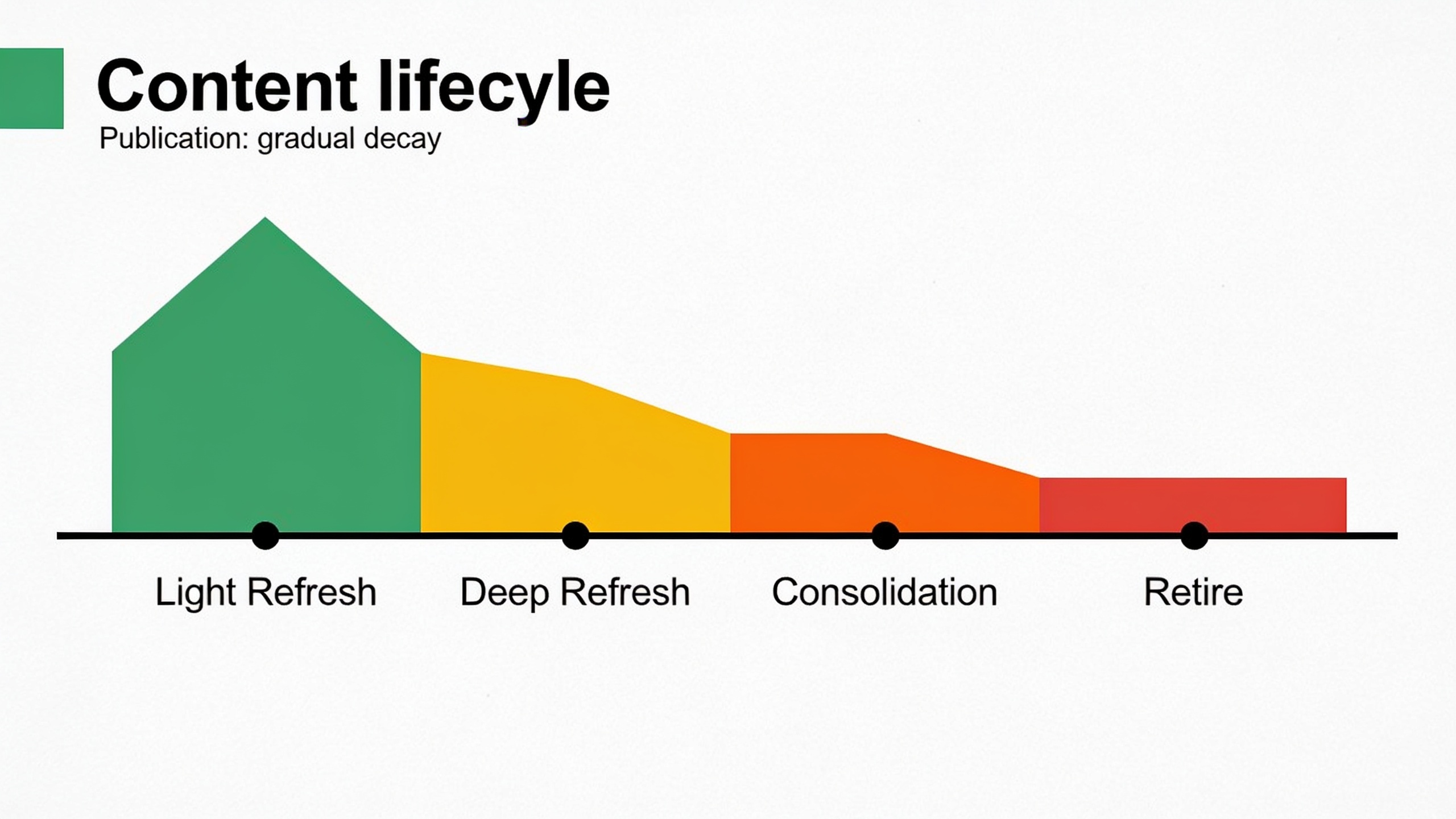
A handful of rules make this framework actually survive contact with a real editorial calendar.
Prioritize by traffic potential, not by how scary the decline percentage looks. A page that fell from 50 clicks a month to 10 matters way less than one that dropped from 5,000 to 3,500, even though the percentage on the first one is worse. And whatever you do, don't touch the URL during a refresh unless you're deliberately consolidating, because changing the slug wipes out the historical signals Google uses to trust the page. That mistake is painful and completely avoidable.
Keep the original publish date visible in the byline but add a clear "last updated" date on top of it, since both readers and search engines read that as a freshness cue. Oh, and re-run your keyword research before you rewrite anything. Search intent may have wandered off since you first hit publish, and the refresh is your shot at realigning the content with how people actually search now.
Teams that turn this into a routine, treating refreshes as a standing item on the calendar instead of a panicked rescue mission, tend to recover faster simply because they catch decay while it's still mild. This is honestly part of why AI-assisted publishing has caught on. Platforms like RobinRank handle the grind of ongoing writing and publishing on autopilot, which frees up the hours you'd normally spend drafting brand-new posts and lets you point that time at auditing and refreshing the stuff already living on your site.
How Often Should You Audit Content for Decay?
A quarterly audit is a solid baseline for most sites, though if you're publishing a ton or fighting in a brutally competitive niche, a monthly check on your top 20-50 pages is worth it. There's no one-size-fits-all answer here. The right rhythm depends on how fast your SERPs shift and how much content you've stacked up over the years.
As a practical starting point: monthly, spot-check your top 10-20 traffic drivers for early warning signs like impressions or CTR trending down. Quarterly, run a full audit across everything indexed, grouped by traffic tier, so you catch mid-level decay before it graduates into a deep-refresh headache. And once a year, walk your whole content inventory looking for consolidation opportunities and dead pages that should just be retired or redirected.
Sites cranking out dozens of new articles a month pile up decay candidates faster, simply because there's more surface area aging all at once. If part of your operation is automated, do yourself a favor and bake the audit into the same workflow, otherwise refresh work always loses to the pressure of shipping new posts.
Common Mistakes That Accelerate Content Decay
A few editorial habits speed decay up way past its natural pace, and the good news is nearly all of them are avoidable with a little process discipline. Spotting these in your own workflow is usually the fastest way to stop the bleeding.
The big one is publishing and forgetting. So many people treat "published" as the finish line when it's really the starting gun for that page's whole lifecycle. Articles with nobody responsible for checking in on them decay faster, because there's literally no one around to notice the early warning signs.
Thin content ages badly too. Short, surface-level posts have no room to absorb an outdated detail gracefully, so one stale statistic can tank the credibility of the entire page. Then there's internal linking, which people neglect constantly. As your site grows, your older articles need fresh links pointing to your newer, more relevant stuff. Skip that and authority stops flowing to new content while your old pages turn into isolated dead ends.
Letting cannibalization run wild is another quiet killer. Publish two or three articles chasing the same keyword with no plan to consolidate, and they'll drag each other down, accelerating decay for both. And finally, technical hygiene. Slow pages, missing schema, broken images. This junk compounds over time as your CMS, theme, and plugins all update on their own schedules without asking your content how it feels about it.
These are the same underlying issues I get into over in 5 Content Marketing Mistakes That Are Quietly Wrecking Your SEO, which unpacks how small editorial habits snowball into major traffic losses.
What Happens When You Refresh Content the Right Way
Done right, a refresh can bring an article all the way back to its old traffic peak and sometimes push past it, often faster than ranking a brand-new page from zero, because the URL already carries authority, backlinks, and indexing history that a fresh page has to earn the hard way. This is exactly why experienced SEO folks treat refreshes as higher-leverage than endlessly chasing new topics.
The mechanics aren't complicated. Google already trusts the URL, so a meaningful update can trigger a re-crawl and re-evaluation without that multi-month "sandbox" wait new content usually has to endure. Pair that with sharper keyword targeting and some solid internal links from your newer articles, and a well-done refresh can climb back toward its old position in weeks instead of months. It's kind of satisfying to watch, actually.
This same idea, consistent publishing plus deliberate optimization, shows up in AI Content Case Study: How a SaaS Startup Tripled Organic Traffic in 6 Months, which walks through how a structured content operation turned into real, measurable organic growth. The discipline that fuels new content growth, clear topic prioritization, a steady publishing cadence, attention to the on-page basics, applies just as directly to refresh work.
FAQ
Is content decay the same as a Google penalty?
Nope. A penalty is Google deliberately smacking your site for breaking its guidelines, and it usually causes a sharp, sudden drop across a bunch of pages at once. Content decay is gradual, page-specific, and driven by aging info, tougher competition, and shifting intent. You didn't do anything wrong. The world just moved.
How long does it take for an article to start decaying?
There's no fixed timer, since it depends heavily on how competitive the topic is and how fast the underlying facts change. Fast-moving stuff like software or industry statistics can start slipping within 6-12 months, while a solid evergreen how-to might cruise along for two years or more before it needs any attention.
Should I update the publish date when I refresh an article?
Keep the original publish date visible and add a clearly labeled "last updated" date next to it. That's honest with your readers and still signals freshness to search engines, which beats quietly swapping the original date and hoping nobody notices.
Can I prevent content decay entirely?
Not entirely, and anyone who tells you otherwise is selling something. Some decay is just the natural cost of a moving search landscape and competitors publishing better stuff over time. But you can slow it way down with strong internal linking, regular audits, and building genuine depth into articles from the start so they age more gracefully.
What's the difference between refreshing and rewriting an article?
A refresh updates the specific bits that have gone stale, stats, examples, links, sections that no longer reflect current best practice, while keeping the structure and URL that already carry your ranking signals. A full rewrite replaces most of the content, and you usually save that for articles where the original angle or search intent has become basically irrelevant.
---
Here's what I keep coming back to: content decay isn't proof your strategy failed. It's proof it worked well enough, for long enough, that the competition finally caught up. The sites that keep winning in search aren't necessarily the ones publishing the most. They're the ones treating their existing library as a living asset that needs actual upkeep. Build a real audit habit, match the right level of refresh to each article's decline, and carve out enough time from new publishing to actually do the work. That's the whole difference between a blog that slowly fades and one that keeps compounding year after year.
Ready to stop writing content by hand? Start your free RobinRank trial and get a full month of SEO-optimized articles published on autopilot.