Content Repurposing: Turning One Article Into 10 Pieces of Content

If you're a marketer with too little time and probably too few people on your team, this should matter to you. Most teams I talk to don't actually have a content shortage. They have a distribution problem. The research, the interviews, the data pulls, the SEO structuring, that's the expensive part. Repurposing lets you cash in on that work more than once instead of letting it die on a single URL.
So this guide covers how to actually repurpose a blog post step by step, which formats work where, how long it really takes (not the fantasy version), and the mistakes that trip people up.
Table of Contents
- What Is Content Repurposing?
- Why Repurpose Blog Content Instead of Writing Something New?
- How Do You Turn One Article Into 10 Pieces of Content?
- Content Repurposing by Channel: A Format Comparison
- How Long Does Content Repurposing Take?
- Common Content Repurposing Mistakes to Avoid
- Where Content Repurposing Fits Into an Automated Content Workflow
- FAQ
What Is Content Repurposing?
Content repurposing is adapting the core ideas, data, and structure of something you already published into new formats for new channels, instead of writing original content from a blank page every single time. The original article stays put as your "hub," and everything else (social posts, videos, email sections, decks) becomes a "spoke" that branches off it.
And no, this isn't just copy-pasting the same text everywhere. A properly repurposed piece respects wherever it's landing. A LinkedIn post should read like a LinkedIn post, not a chopped-up blog paragraph with a link stapled to the bottom. Same idea underneath, totally different wrapping.
Honestly, repurposing works best when the source has some meat on it. A 1,500 to 2,500 word article with real sections, a couple of data points, and an actual argument gives you way more to slice up than some 400-word update. That's exactly why long-form SEO articles are such good candidates. They're already broken into logical chunks (intro, subheadings, examples, conclusion) that map onto shorter formats almost too neatly.
Why Repurpose Blog Content Instead of Writing Something New?
Because repurposing lets you show up on the platforms where your audience actually hangs out, without paying full price for original research and writing on every post. The core article does the heavy lifting once. Everything after that is lighter adaptation.
There are three reasons this tends to beat the "write everything fresh" approach, at least for small teams.
First, it matches how people actually consume stuff. Not everyone who'd get value from your article is going to read it on your blog. Some want a 60-second video. Some scroll LinkedIn on the train. Some only ever open your newsletter. Repurposing meets those people where they already are instead of just hoping they wander over to your site.
Second, it compounds the value of your best work. If an article took real effort (competitor research, customer interviews, a Domain Rating analysis, some original data), that effort shouldn't pay off exactly once and then disappear. Turn it into ten assets and that same insight gets ten shots at a click, a share, or a lead.
And third, it keeps you publishing regularly without torching your team in the process. A small marketing crew or a solo founder can realistically crank out one solid article a week. Repurpose that thing correctly and it fills a whole social calendar with daily posts, with material left over for the next newsletter. This is especially true for startups and small businesses that don't have a dedicated content department, which is something I dug into more in how a resource-constrained SaaS startup built a content engine that actually worked.
How Do You Turn One Article Into 10 Pieces of Content?
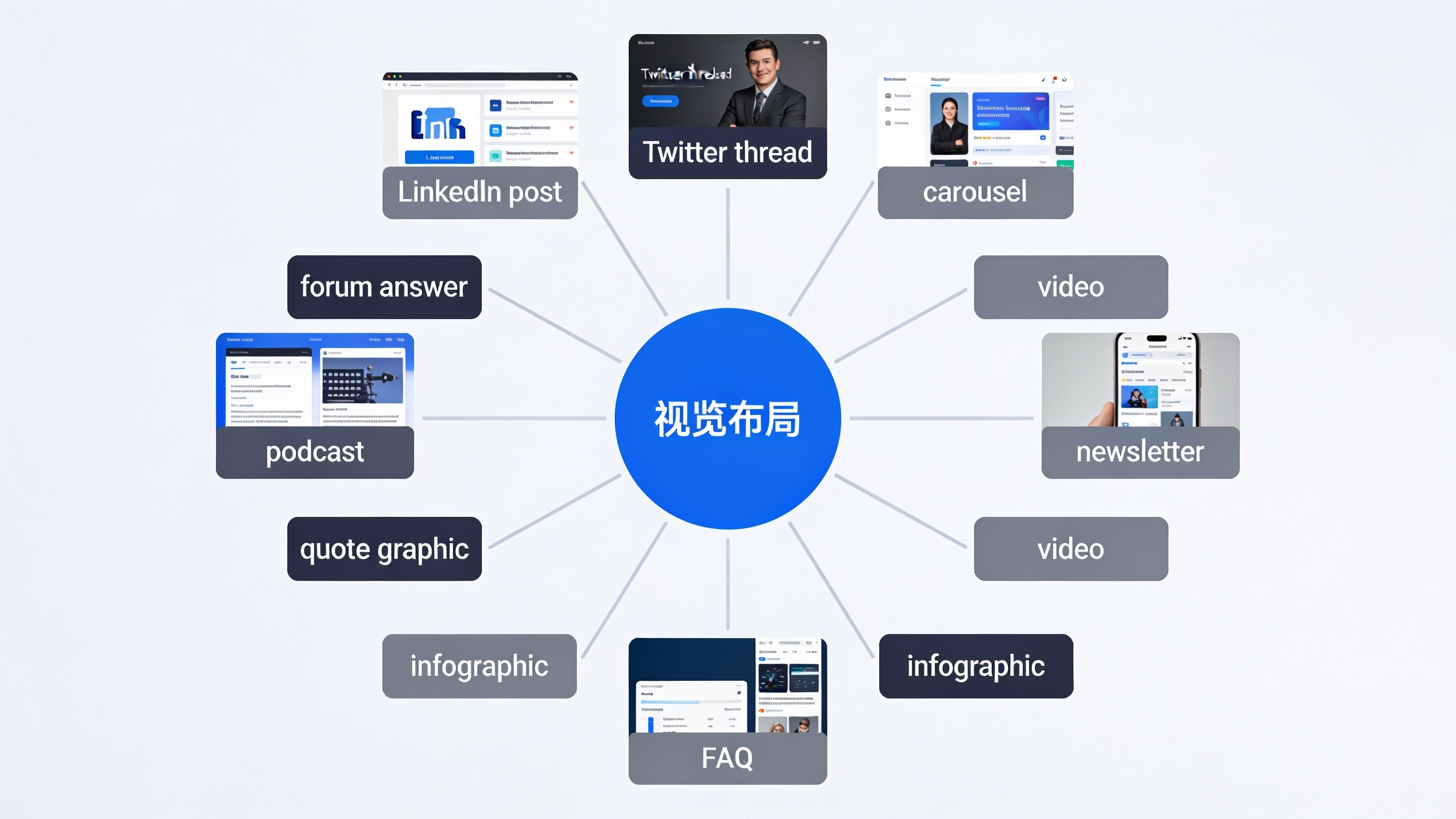
You do it by finding the article's distinct sub-ideas (each subheading, stat, quote, and example) and matching each one to whatever format shows it off best. Let me walk through ten formats using one made-up article as our example: "The Complete Guide to Local SEO for Small Businesses."
1. LinkedIn Text Post
Grab the single most counterintuitive or genuinely useful point from the article and just lead with it. No windup. A LinkedIn post built around one specific claim ("Google Business Profile updates matter more than backlinks for local rankings in most markets") beats a generic "check out my new blog post!" every time, because it stands on its own even for someone who never clicks through.
2. Twitter/X Thread
Break your H2 sections into individual tweets, one idea per tweet, and rework the article headline into your hook. A five-section article maps almost perfectly onto a 6-8 tweet thread. One hook, one tweet per section, one closer with the link back.
3. Carousel or Slide Deck
Any listicle section, comparison, or step-by-step process turns into a visual carousel for LinkedIn or Instagram. One idea per slide, barely any text. Your H3 subheadings usually work as slide titles right out of the box.
4. Short-Form Video Script
Take the core argument and squeeze it into a 60 to 90 second script: hook in the first three seconds, one supporting example, one call to action. This is probably the hardest one to repurpose into because it demands the most compression. But it also reaches people who would never in a million years click a blog link.
5. Email Newsletter Section
Rewrite your intro or your most surprising finding as a standalone newsletter blurb with a "read the full breakdown" link. Don't dump the whole article into an email. Treat the newsletter as a teaser for one specific angle. Keeps your open rates and click intent higher because people know exactly what they're clicking into.
6. Infographic or Data Visual
Got numbers, comparisons, or a process with sequential steps? That's your infographic. Even a dead-simple "before vs. after" or "3-step process" visual can outperform a text post for the boring reason that it's just more shareable.
7. FAQ-Style Social Posts
If the article has an FAQ section, pull it apart and post each question-and-answer as its own little post across the week. This is one of the laziest wins available, and I mean that as a compliment. The content's already written in clean, self-contained Q&A format. Barely any rewriting.
8. Quote Graphics
Pull one strong sentence, ideally something with a specific number, a bold claim, or a phrase that sticks, and turn it into a text-on-image graphic for Instagram or Pinterest. Works great for the opinionated or contrarian lines that were sort of buried in the middle of the article.
9. Podcast or Audio Segment
If you or anyone on your team records audio, the core argument becomes a 5-10 minute talking segment, with the original subheadings as a loose outline. Bonus: this format lets you add commentary and nuance that never fit into the written version.
10. Community or Forum Answer
A lot of long-form articles were written to answer a question your audience is already asking somewhere. Reddit, an industry Slack, some niche forum. Repurposing here means actually answering the question, naturally, and then mentioning the fuller article. Not dropping a thin summary that reeks of self-promotion. People can smell that instantly.
Once all ten of these are out in the world, the article stops being just a traffic source and starts being a conversion tool. If you're repurposing specifically to drive signups or demos rather than plain visibility, it's worth pairing this whole workflow with a deliberate call-to-action strategy on each asset, which is what I get into in turning blog traffic into leads with a content lead generation playbook.
Content Repurposing by Channel: A Format Comparison
Not every format takes the same amount of work, and not every format reaches the same crowd. The table below compares the ten formats on effort, best-fit audience, and how directly each one tends to send people back to the original article.
Want content like this running on autopilot for your own site? Try RobinRank free — AI-written, SEO-optimized articles generated and published automatically, no credit card required.
| Format | Rework Effort | Best-Fit Audience | Drives Traffic Back? |
|---|---|---|---|
| LinkedIn text post | Low | B2B professionals, decision-makers | Moderate |
| Twitter/X thread | Low-Medium | Fast-moving, niche communities | Moderate |
| Carousel/slide deck | Medium | Visual learners, LinkedIn/Instagram | Low-Moderate |
| Short-form video | High | Broad, mobile-first audiences | Low |
| Newsletter section | Low | Existing subscribers/leads | High |
| Infographic | Medium-High | Shareable, data-curious audiences | Low-Moderate |
| FAQ social posts | Very Low | Bottom-of-funnel, high-intent readers | High |
| Quote graphic | Very Low | Broad social audiences | Low |
| Podcast/audio segment | Medium | Commuters, passive listeners | Low |
| Community/forum answer | Low-Medium | High-intent question askers | High |
Notice the pattern here, because it's a little counterintuitive. The lowest-effort formats (FAQ posts, quote graphics, newsletter sections) are often just as good, sometimes better, at driving qualified traffic than the high-effort stuff like video. Keep that in mind before you sink hours into a slick video when a repurposed FAQ section might convert just as well with a tenth of the work.

How Long Does Content Repurposing Take?
Realistically, one article can be turned into 8-10 assets in a focused half-day session once you've got a repeatable checklist, though the time scales up depending on how many high-effort formats (video, infographic) you throw in. The low-effort stuff, social posts, newsletter blurbs, FAQ snippets, can each take under 15 minutes because they lean almost entirely on text that's already sitting in the source article.
Here's a batching approach that actually works:
- Extract first, write second. Before you draft anything new, go through the article and highlight every quotable sentence, stat, subheading, and example. This turns repurposing into an assembly job instead of a blank-page writing job. Huge difference.
- Batch by format, not by article. Write all five LinkedIn posts for the week in one go, then all three newsletter blurbs. Don't try to produce one article's full 10-asset spread in isolation. Constantly switching between formats is what actually slows you down.
- Save the high-effort formats for your best articles. Not every piece deserves a video or an infographic. Reserve that investment for the ones already pulling strong organic traffic or engagement, and only repurpose your lower-traffic articles into the fast formats.
Teams publishing on a steady schedule (say, one long-form article a week) can use that single piece to fill an entire week of social plus part of the next newsletter. Which takes a real chunk of pressure off the whole "we need fresh ideas every single day" treadmill.
Common Content Repurposing Mistakes to Avoid
The number one mistake is treating every format like a copy-paste of the original article instead of adapting it to the platform. A LinkedIn post that reads like a blog excerpt, or a tweet thread that's just paragraphs hacked into 280-character chunks, underperforms because it ignores how people actually read on that platform. Nobody's fooled.
A few others worth watching for.
Repurposing before the source is actually any good. If the original is thin, badly structured, or missing real examples, all you're doing is multiplying one weak asset into ten weak assets. Fix the source first. Always.
Publishing everything on the same day. Dumping all ten pieces at once dilutes each one's reach and, worse, looks spammy to anyone following you across a few channels. Space them out over a week or two and let each one have its moment.
Losing the specific numbers and examples in translation. It's so tempting to smooth a statistic or a named example into something vaguer when you're compressing for a shorter format. Don't. Specific numbers and named examples are usually the most quotable, shareable part of anything you write, both on social and, increasingly, in AI-generated answers.
And forgetting to link back. Every repurposed asset needs some path (a link, a mention, a "full guide here") back to the original. Partly to credit the source, partly to funnel the interested people toward the deeper stuff.
Where Content Repurposing Fits Into an Automated Content Workflow
Repurposing works best when the source article is already structured, well-researched, and published on a consistent schedule. Which, funny enough, is exactly the part that eats the most time for small teams. This is where platforms built around content production and publishing can take some of that upfront weight off, leaving you more room for the actual repurposing.
RobinRank is an AI-powered SEO platform built around a three-step workflow. It analyzes your niche, competitors, and Domain Rating to spot content topics and backlink opportunities; it writes and publishes SEO-optimized articles straight to a connected CMS like WordPress; and it verifies live backlinks so that only real, published links count toward its community-based link exchange. Each draft comes with an SEO score, plus meta descriptions, internal and external links, schema markup, and alt text generated automatically, and everything stays fully editable before you hit publish.
For a marketing team, a founder, or an agency trying to build a repurposing pipeline, that automated publishing schedule (RobinRank supports scheduled, recurring publishing directly to a connected CMS) means your raw material, a new, structured, well-optimized article, shows up on a predictable cadence without anyone manually babysitting the writing and publishing every week. And that predictability is honestly what makes a repeatable repurposing checklist stick around instead of fizzling out as a one-time experiment.
FAQ
Wait, does repurposing hurt my SEO with duplicate content?
No, not in the way search engines actually penalize. Your repurposed formats (social posts, videos, newsletter sections) live on different platforms and in different formats than the original, not as copy-pasted web pages. Duplicate content problems usually come from publishing the same or near-identical text across multiple URLs on your own domain, which is a totally separate issue from cross-platform repurposing.
How soon after publishing should I start repurposing?
No hard rule, but a lot of teams start within the first few days while the topic's still fresh, then keep pulling assets from the same article for weeks or even months. Evergreen articles especially can be repurposed several times over a quarter without going stale, as long as you switch up the angle or format each time.
Which format actually drives the most traffic back?
Going by the table above, the low-effort formats tied to high-intent audiences win: newsletter sections sent to existing subscribers, and FAQ-style posts answering specific questions. Those send people back more directly than broad-reach formats like short videos or quote graphics, which are really more about brand awareness than click-through.
Do I need special tools, or can I do this by hand?
You can do it entirely by hand with just the article, a highlighter (physical or digital, your call), and a content calendar. The extraction and adaptation steps I described don't need any special software. Design tools help for the visual stuff like carousels and infographics, and scheduling tools help with distribution, but neither is required to get going.
How many pieces should come from one article?
Ten's a handy benchmark because it maps cleanly onto the major formats across social, email, and video. But the honest answer is it depends on how much distinct, quotable material the source actually has. An article with five well-developed sections, a real data point, and an FAQ will give you way more usable assets than a short opinion piece with one argument.
---
Turning one article into ten pieces isn't about stretching thin material further than it deserves to go. It's about realizing that a well-researched, well-structured article already contains most of the raw ingredients a week's worth of content needs. Repurposing is really just translation. Taking the same core idea and speaking it fluently in the language of wherever it lands.
Ready to stop writing content by hand? Start your free RobinRank trial and get a full month of SEO-optimized articles published on autopilot.