How to Perform a Content Audit That Actually Improves Traffic

Here's what nobody tells you: if your site has been around for more than a year, you're almost certainly sitting on pages that used to rank and have quietly slid down the results. You just haven't noticed because, well, why would you? Nobody checks a two-year-old post unless something forces them to. A proper audit is the fastest way to catch those and fix them.
This guide covers the whole thing. How to take inventory of what you've got, which numbers actually mean something (and which are noise), how to diagnose why a page is tanking, and how to breathe life back into old content in a way that both Google and real humans respond to.
Table of Contents
- What Is a Content Audit and Why Does It Matter?
- How to Prepare for a Content Audit
- Which Metrics Should You Track During a Content Audit?
- How to Categorize Your Content: Keep, Refresh, Consolidate, or Remove
- How Do You Refresh Old Content to Reclaim Rankings?
- Building a Repeatable Content Audit Workflow
- Common Content Audit Mistakes to Avoid
- Frequently Asked Questions
What Is a Content Audit and Why Does It Matter?
A content audit is the process of cataloging and evaluating every page on your site to figure out which ones are actually helping your traffic goals and which ones are just taking up space. It matters because search engines never stop re-judging your content for freshness, accuracy, and relevance. A page that crushed it in 2022 can quietly lose all its visibility by 2024, not because you did anything wrong, but because a competitor published something better and more current, or because what people were searching for shifted underneath you.
This slow bleed has a name: content decay. Your organic traffic to a page just drips away over time, even though you never touched the page. And it happens for a bunch of overlapping reasons. Stale statistics. Broken links. Algorithm updates that suddenly reward freshness. Some competitor dropping a 4,000-word monster that makes your 800-word post look like a napkin scribble. An audit is how you catch decay before it becomes a full-blown ranking collapse.
But there's a bigger, more strategic question hiding in here too. If you're managing dozens or hundreds of URLs, where should you actually spend your time? Writing new stuff feels productive. It scratches that itch. But honestly, if half your existing catalog is quietly slipping, the smartest move is almost always to fix what you've already got instead of piling on more. This goes double for small business owners and founders who can't churn out content at scale. Every article you've published is money and hours you already spent. Protecting that investment is just common sense.
How to Prepare for a Content Audit
Prepping for an audit means gathering a complete list of every published URL and hooking up the data sources you'll need before you start analyzing anything. Skip this and you'll end up making decisions off partial or outdated numbers, which is worse than not auditing at all.
Build a Complete Content Inventory
Start by exporting every published URL on your site. Your CMS probably has an export tool, or you can crawl your XML sitemap, or run something like Screaming Frog or Sitebulb. Whatever gets you there. What you want at the end is one spreadsheet with a single row per URL, and each row should carry the publish date and last-updated date, word count, the primary keyword or topic, the content type (blog post, landing page, product page, guide), and who owns it.
If you've got a backlog of 200, 500, a thousand-plus posts, this step alone can eat a few hours. I won't pretend otherwise. But it's non-negotiable. You cannot prioritize what you haven't mapped, and every shortcut here comes back to bite you later.
Connect Your Data Sources
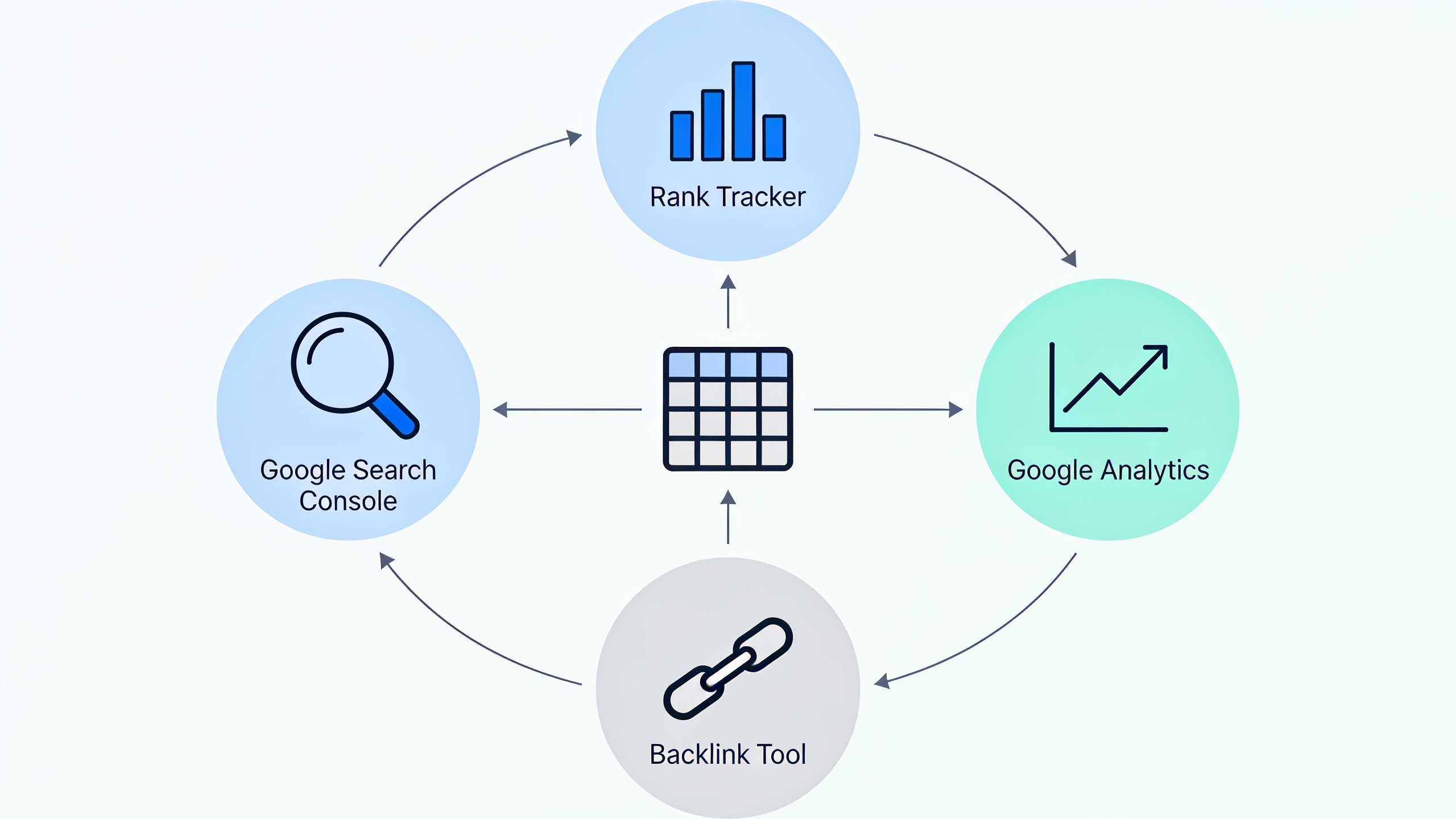
Before you analyze anything, get these plugged in so the data's ready when you need it. Google Search Console for impressions, clicks, average position, and query data. Google Analytics (or whatever analytics platform you like) for sessions, bounce rate, conversions. A rank tracker if you're watching specific keyword positions. And a backlink tool so you can see which pages are holding external links worth protecting.
If you're already running an AI content platform to manage production, it's worth getting your head around how to attribute performance correctly across all these tools. That's a whole topic on its own, and how to measure ROI on AI content marketing tools digs into connecting traffic and conversion data back to specific content investments.
Which Metrics Should You Track During a Content Audit?
The metrics that matter most are organic traffic trend, average position, click-through rate, backlinks, conversions, and freshness. Each one tells you something different about why a page is winning or losing. No single number tells the whole story, and this is exactly where most audits fall apart. People look at traffic alone, make a call, and get it wrong.
Traffic and Ranking Signals
Pull a 12-month organic traffic trend for each URL (longer if you've got the data) from Search Console or your analytics tool. A few things to hunt for. If a page lost 30% or more of its organic sessions versus the same period last year, that's a strong refresh candidate. If a keyword slid from position 4 to position 14, the page is losing relevance or authority to competitors. And if a page ranks well but the click-through rate is weirdly low for that position, the title tag and meta description are the problem, not the body. Rewrite those first before you touch anything else.
Engagement and Conversion Signals
Traffic volume on its own lies to you. A page pulling 5,000 sessions a month that converts nobody might be worth less than a page pulling 500 sessions at a 4% conversion rate. Bounce rate, average time on page, scroll depth if you track it, these tell you whether people are actually reading or bouncing the second they land. And a fast bounce is usually a sign the page no longer matches what people were searching for.
Content Quality and Freshness Signals
Freshness is the last-updated date, whether the stats and examples still hold up, and whether the page reflects how people actually think about the topic now. Classic example: any article still referencing "the latest Google algorithm update" from three years ago. Reads as stale instantly, to both readers and search engines, even if the underlying advice is technically fine. Currency matters more than people think.
Backlink and Authority Signals
Check which pages are holding external backlinks. A page with solid backlinks but sliding rankings is basically the perfect refresh target. The authority is already sitting there, the content just fell behind. Whatever you do, don't delete a page like that or let it 404. You'd be throwing away link equity it took years to earn.
| Metric | What It Tells You | Where to Find It |
|---|---|---|
| Organic traffic trend | Whether a page's visibility is growing, flat, or decaying | Google Search Console, Analytics |
| Average position | How close the page is to page-one visibility for target terms | Google Search Console |
| Click-through rate | Whether the title/meta is compelling relative to ranking position | Google Search Console |
| Bounce rate / engagement time | Whether the content matches searcher intent once they arrive | Analytics |
| Backlinks | Whether the page has authority worth preserving | Backlink tool (Ahrefs, Semrush, etc.) |
| Conversion rate | Whether traffic translates into business value | Analytics / CRM |
| Last updated date | Freshness relative to competitor content | CMS metadata |
How to Categorize Your Content: Keep, Refresh, Consolidate, or Remove
Every URL in your inventory should walk out of this audit sorted into one of four buckets: keep as-is, refresh, consolidate, or remove. This is the step that turns a spreadsheet full of numbers into something you can actually act on.
Keep As-Is
Pages that rank well, convert, and are still accurate don't need you poking at them right now. Seriously, resist the urge. I've seen people "improve" content that was perfectly fine and tank rankings that had been working for months. If it ain't broke and all that. Just flag these for a light look again in 6 to 12 months and move on.
Refresh
This is usually the biggest bucket, and it's where the money is. Refresh candidates are pages that:
- Have declining traffic or position but still hold decent backlinks or historical authority
- Cover a topic that's still relevant to your audience and your business
- Are full of outdated stats, screenshots, pricing, or examples
- Look thin next to whatever's currently sitting in the top three to five spots
Want content like this running on autopilot for your own site? Try RobinRank free — AI-written, SEO-optimized articles generated and published automatically, no credit card required.
Consolidate
Consolidation candidates are pages that overlap heavily with another page on your site, splitting your authority and confusing everyone (search engines included) about which one should actually rank. If you've got three articles all loosely aimed at "email marketing tips," you're competing with yourself. It's almost always stronger to merge the best bits into one comprehensive page and 301-redirect the rest.
Remove
Some content just needs to be put out to pasture. Pages with no traffic, no backlinks, no business relevance, and no realistic shot at improving are better gone (redirect them if they've got any leftover link equity) than left to rot. Google evaluates your site somewhat holistically, and a big pile of thin, outdated, or duplicate pages can drag down how it perceives even your good stuff. Dead weight is dead weight.
How Do You Refresh Old Content to Reclaim Rankings?
You refresh old content by updating stale facts, expanding thin sections, cleaning up the structure, strengthening internal links, and re-optimizing for what people actually search now, then republishing with a fresh timestamp so both readers and search engines register the change. And to be clear, a refresh is not a cosmetic touch-up. It's a real rework aimed at closing the gap between your page and whatever's currently beating it.
Step 1: Analyze What's Currently Ranking
Before you touch the old draft, go search the target keyword and study the top five results. What do they cover that you don't? What format are they using (listicle, guide, comparison table)? How recently were they published or updated? This gap analysis should drive every decision that follows. Don't skip it and just start editing on vibes.
Step 2: Update Facts, Data, and Examples
Swap outdated stats for current ones, update screenshots and product references, fix the broken links, and cut any claim that's no longer true. If you referenced "the latest version" of some tool, name the actual current version instead. Both readers and, increasingly, the AI systems summarizing search results treat specificity and currency as trust signals. Vagueness reads as laziness.
Step 3: Expand Thin Sections and Fill Gaps
If competing pages cover subtopics you skipped, add them. This is also a good moment to rethink structure. Adding H3 subsections, a comparison table, or an FAQ block tends to improve readability and how easily the page can be understood and quoted by AI answer engines like ChatGPT, Perplexity, or Google's AI Overviews. Two birds.
Step 4: Re-Optimize Title Tags and Meta Descriptions
A refresh is the perfect excuse to rewrite the title and meta to be sharper and more clickable, especially if Search Console showed the CTR underperforming for where the page actually ranks. Small change, sometimes big payoff.
Step 5: Strengthen Internal Linking
Add links from your newer, high-authority pages pointing to the refreshed article, and make sure the refreshed piece links out to related stuff too. Internal linking helps search engines understand where the page fits in your overall architecture, and it passes authority to the pages that need it most. People forget this step constantly and leave value on the table.
Step 6: Republish and Monitor
Update the "last modified" date, and if you made substantial changes, treat it as a new tracking milestone in your analytics. Then wait. Give it 4 to 8 weeks before you draw any conclusions, because re-crawling and re-ranking takes time and staring at the data every day will just make you crazy.
If you're producing or refreshing content at scale with AI help, it's worth being realistic about how that content actually performs in search. That's addressed head-on in can AI-generated content actually rank on Google?, which is useful context for anyone weighing whether to refresh by hand or lean on AI-assisted drafting.
Building a Repeatable Content Audit Workflow
A content audit works best as a recurring process baked into your editorial calendar, not a one-time panic project you do once and forget. Run it quarterly, or twice a year at minimum. Treat it as a one-off and decay just quietly creeps back within a few months, and then you're right back where you started.
Set a Cadence
Small sites with fewer than 50 posts can usually get away with a full audit every six months. Bigger sites publishing weekly should think about a rolling audit instead, reviewing a chunk of the catalog (say, everything older than 12 months) each quarter rather than trying to swallow the whole thing at once. Rolling is way more sustainable, and you'll actually stick with it.
Assign Ownership
Every flagged or refreshed page needs a person responsible for actually doing the update, not just noting that it needs doing. This is where most audits go to die. You end up with a beautiful spreadsheet full of "should refresh" rows that nobody owns, and six months later not one of them got touched. Name a name for each one.
Track Outcomes
For every refreshed page, log the before-and-after traffic, position, and conversion data. Over time this builds you an internal benchmark for how much a refresh typically moves the needle on your specific site, which is genuinely useful for prioritizing future work and for justifying the hours to whoever holds the budget.
Common Content Audit Mistakes to Avoid
The most common audit mistakes come down to leaning on traffic alone, refreshing without checking competitors, ignoring the pages cannibalizing each other, and treating the whole thing as a one-and-done project.
A few specific traps worth calling out:
- Refreshing without checking competitors first. Bumping the date and rewording a few sentences without understanding what's currently outranking you almost never brings the rankings back. You're guessing.
- Ignoring keyword cannibalization. If two of your own pages are fighting over the same query, refreshing one while ignoring the other can leave both of them stuck in the mud.
- Chasing word count. Adding length just to add length does nothing. Padding is padding, and readers (and Google) can smell it.
- Deleting pages with backlinks and no redirect. This is just throwing away link equity that could've been propping up your site. Redirect, always.
- Treating every low-traffic page the same. A brand-new post that hasn't had time to rank is a completely different animal from a three-year-old page that's clearly plateaued. Sort by content age and lifecycle, not just the raw numbers.
Frequently Asked Questions
How often should I actually do this?
Most teams do well with a full content audit every six to twelve months, plus smaller rolling reviews (focused on posts older than a year) every quarter. If you publish a lot, or you're in a fast-moving space like SaaS, finance, or health, lean toward the more frequent end. Information ages faster in those worlds and stale content gets punished quicker.
What's the difference between a content audit and a content refresh?
The audit is the diagnosis. You inventory and analyze everything to figure out what's underperforming and why. The refresh is the treatment, the actual work you do on the specific pages the audit flagged: updating facts, structure, optimization. Audit first, then refresh what needs it. Don't skip straight to editing.
How do I know whether to refresh a page or just kill it?
Refresh pages that still target a relevant topic, hold some backlinks or historical authority, and mostly just need current info or better structure. Delete or consolidate the ones with no realistic path forward, meaning no search demand for the topic anymore, no backlinks, and no overlap with what your business actually cares about now.
Can AI tools help with an audit?
Yeah, for parts of it. AI is genuinely handy for summarizing traffic patterns, spotting outdated stats, or drafting updated sections once you've decided what to change. But the strategic calls, what to keep, merge, or cut, still need human judgment about business priorities and search intent. Don't outsource the thinking.
Will refreshing old content really bring back lost rankings?
No guarantees, and anyone promising otherwise is selling something. But a refresh does tackle the most common causes of decay: outdated info, thin coverage next to competitors, and weak internal linking, all of which are within your control. Pair that with a few weeks of monitoring after you republish, and a well-done refresh is honestly one of the more reliable ways to claw back visibility on a page that already has some authority to build on.
---
A content audit is not glamorous work. Nobody's bragging about it at conferences. But it's one of the few SEO activities where what you get out is almost perfectly proportional to what you put in. Every page you inventory, sort, and fix is a page that stops quietly dragging your whole site down. And for anyone who can't afford to constantly crank out new material, that alone makes the audit one of the highest-leverage things you can put on the calendar.
Ready to stop writing content by hand? Start your free RobinRank trial and get a full month of SEO-optimized articles published on autopilot.