How to Set Up an Automated SEO Content Workflow in 30 Minutes

An automated SEO workflow is basically a system that uses AI to do keyword research, draft articles, optimize them for search, and publish them to your site, mostly without you babysitting each step. That's the short version. This guide walks you through setting one up in about half an hour using RobinRank, from creating your account to your first live article.
A lot of small businesses and startups still think SEO means you either build a content team or hand an agency five grand a month. That hasn't been true for a while. A 2023 survey from the Content Marketing Institute found that 73% of B2B marketers now use AI tools somewhere in their content process, and that number jumped hard from the years before. This isn't about handing your strategy over to a robot. It's about killing the tedious, repetitive parts that keep good ideas stuck in your head instead of on the page.
Below is the actual step-by-step, plus the reasoning behind each move so you know why you're clicking what you're clicking, not just where.
Table of Contents
- What Is an Automated SEO Content Workflow?
- What Do You Need Before You Start?
- Step 1: Setup AI Content Tool and Connect Your Website
- Step 2: Define Your Content Strategy Inputs
- Step 3: Configure Automated Publishing Rules
- Step 4: Layer In Link Building
- Step 5: Review, Monitor, and Refine
- How Long Does It Really Take to See Results?
- Common Mistakes to Avoid
- FAQ
What Is an Automated SEO Content Workflow?
An automated SEO content workflow is a connected system, usually software plus a set of rules, that handles keyword research, drafting, on-page optimization, and publishing without a human doing each task by hand. Instead of you opening a blank doc and staring at it, you define the parameters once (topics, tone, how often to publish, which site) and the system just runs on repeat.
And this is genuinely different from "using AI to write a blog post." A one-off AI article is a single thing. A workflow is a pipeline. It figures out what to write based on actual search demand, drafts something optimized for that keyword, formats it with proper headings and metadata, and pushes it live. Then it does it again. On a schedule. That difference matters more than people think, because search engines reward consistency over time way more than they reward one brilliant post. Google's own docs on helpful content basically say the same thing: they want sustained, people-first publishing, not random bursts of effort. Which is exactly the thing automation is good at.
For a small team, the real payoff is time. A single well-optimized article might eat three to six hours of a good writer's day between research, drafting, and formatting. Automation squeezes that down to a few minutes of generation plus a quick human read-through. That's hours back for you to actually work on your product and talk to customers instead of wrestling with a content calendar.
What Do You Need Before You Start?
You need three things: a live website you can access through your CMS, a clear idea of who your customer is and what topics matter, and about 30 uninterrupted minutes. That's it. No coding, no design work, no content hire.
Before you log in, pull together a few things so you're not fumbling around mid-setup. Have your website credentials ready. If you're on WordPress, Webflow, Shopify, or something similar, grab your login or API key so RobinRank can publish straight to your site. Jot down a short list of core topics too, maybe three to ten themes your business actually knows something about, like "invoicing software for freelancers" or "commercial HVAC maintenance." Grab two or three competitor or inspiration URLs, sites you think do content well, since those help calibrate tone and depth. And have a rough publishing goal in mind, even something loose like "two articles a week."
Honestly, having this stuff ready is the whole trick to hitting the 30-minute mark. Most of that time isn't spent poking at software. It's spent deciding what to tell the software about your business.
Step 1: Setup AI Content Tool and Connect Your Website
The first real step is to set up your AI content tool and link it to your live site, which takes about five to seven minutes. In RobinRank that means creating an account, entering your domain, and authorizing a publishing connection, whether that's through a CMS plugin, an API key, or a direct integration depending on your platform.
While you're doing this, RobinRank scans your existing site to figure out your niche, spot content gaps, and check your technical SEO baseline. Page speed, existing metadata, indexed pages, that kind of thing. This scan actually matters. A workflow that ignores where your site currently stands can crank out content that's wildly mismatched to your domain's authority or audience. A brand-new site trying to rank for cutthroat commercial keywords is playing a completely different game than an established site quietly filling in long-tail gaps.
Once the connection checks out, you'll get a dashboard confirming it's live. If you're still deciding whether a platform like RobinRank actually fits your stack, or whether something like Surfer SEO makes more sense, I'd read RobinRank vs Surfer SEO: Which Tool Fits Your Workflow? before you commit. The right pick really comes down to whether you want full end-to-end automation or just a research-and-optimization layer that still needs you to bring a writer.
Choosing Your CMS Integration Method
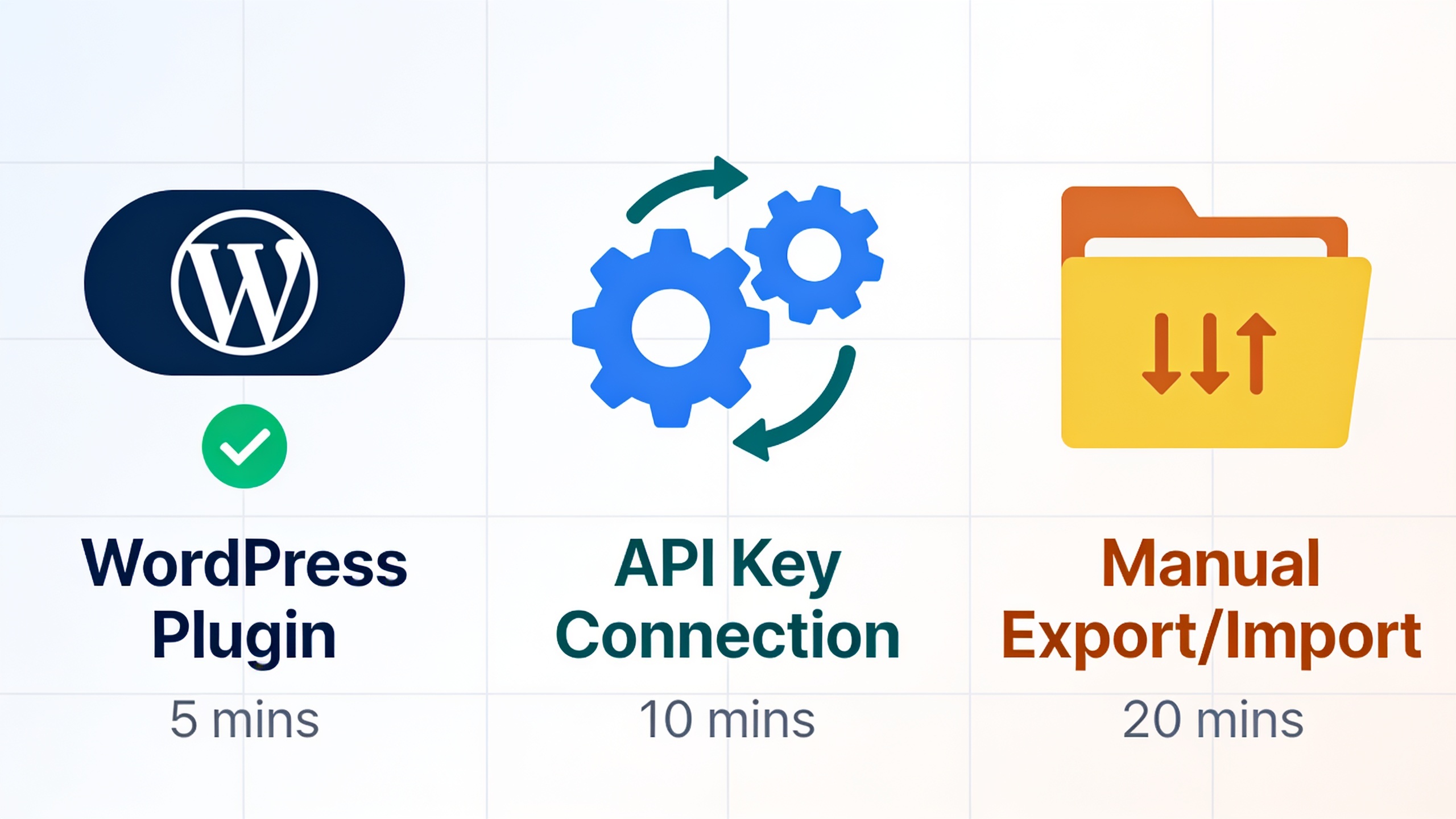
Most CMS platforms use one of three connection types, and getting this right now saves you a reconfiguration headache later.
| Integration Method | Best For | Setup Time | Publishing Control |
|---|---|---|---|
| WordPress Plugin | Sites already on WordPress | 2-3 minutes | Full auto-publish or draft-only |
| API Key Connection | Custom or headless CMS builds | 5-10 minutes | Full auto-publish or draft-only |
| Manual Export/Import | Sites without direct integration support | 10-15 minutes per batch | Manual review required |
For most small businesses, the WordPress plugin is the fastest route by a mile. Agencies juggling a bunch of client sites usually go with API connections instead, since those scale more predictably across accounts.
Step 2: Define Your Content Strategy Inputs
Defining your strategy inputs just means telling the system your target keywords, brand voice, and audience so the articles it spits out actually sound like you and target searches your customers really make. This takes about ten minutes, and it's the single most important step for keeping quality up over the long haul. Don't rush it.
Inside RobinRank, here's what you'll usually be setting up.
Start with your topic clusters. Don't just dump a pile of random keywords in. Group them around your core products or services. Say you're a B2B SaaS founder selling scheduling software. You might build clusters around "appointment scheduling," "calendar automation," and "no-show reduction." Clustering is how you build topical authority, which is basically search engines' way of deciding whether your site covers a subject thoroughly or just posts scattered, opportunistic one-offs.
Then there's brand voice and tone. You can dial in formality, whether you want humor in there, sentence length, point of view (the corporate "we," a third-person brand voice, whatever). RobinRank leans on this to keep drafts consistent across dozens of articles. And that consistency matters, because inconsistent tone is honestly one of the fastest ways readers sniff out lazy AI content.
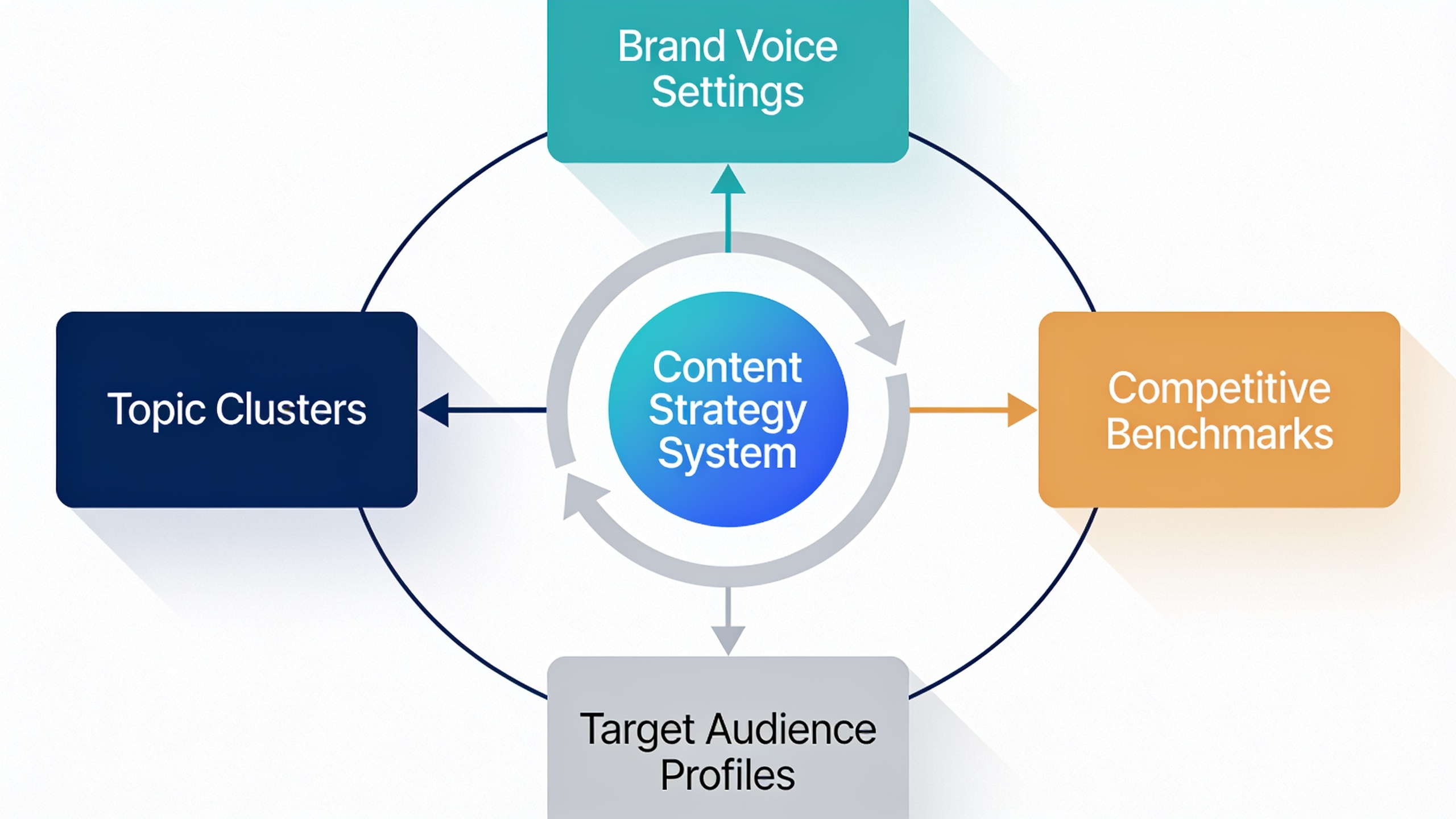
Spell out your target audience too. Are you writing for SEO pros? Small business owners? Enterprise buyers? This shapes vocabulary, examples, how deep you go. A piece for startup founders should read nothing like one for technical SEO specialists, even if they're on the same topic.
Finally, feed in a couple of competitive benchmarks, two or three competitor URLs per cluster. That lets the system gauge the right depth and structure so your content ends up genuinely comprehensive instead of thin and forgettable.
The nice part: once you set all this, it sticks around for future generations. So this is mostly a one-and-done investment, not something you redo for every single post.
Step 3: Configure Automated Publishing Rules
Publishing rules decide how much human oversight sits between "article generated" and "article live on your site." You've got three flavors: full automation (goes live with no review), semi-automation (drafts wait for your approval), or hybrid rules that shift based on content type or how sensitive the topic is.
Want content like this running on autopilot for your own site? Try RobinRank free — AI-written, SEO-optimized articles generated and published automatically, no credit card required.
This takes about five minutes, and it's usually where founders get nervous. Which, fair. A mistake that's already published is a lot more painful and public than one sitting in a draft folder.
Full automation is great for low-stakes, high-volume stuff. How-to guides, glossary-style definitions, comparison posts where the factual risk is minimal. RobinRank's optimization layer checks keyword placement, heading structure, readability, and internal linking automatically before anything goes out.
Semi-automation is smarter for anything touching pricing claims, legal or medical nuance, or statements about competitors. For those, set the workflow to generate the full draft but park it in a review queue instead of publishing straight away.
Hybrid rules let you mix the two. Auto-publish your educational blog content, but route "vs." comparison articles or pricing pages to manual review. Most people who've used RobinRank for a while end up here after their first month, once they've watched which article types reliably need edits and which ones basically never do.
Whatever you pick, set your publishing cadence during this step too. And this ties into a bigger strategic question a lot of teams flat-out get wrong: how often should you actually publish? The link between publishing frequency and organic growth isn't a straight line. Quality and consistency both pull weight, which is dug into properly in How Often Should You Publish Content for SEO Growth?. For most small businesses, two to four articles a week is a sane starting point. Scale up only after the first month gives you real performance data to work with.
Step 4: Layer In Link Building
Link building inside an automated workflow means connecting your published content to a wider network of relevant sites so your pages earn backlinks without you running manual outreach campaigns. Backlinks are still one of the strongest ranking signals out there, and Google's confirmed more than once that links sit among the top few factors shaping search rankings.
RobinRank does this through a natural backlink exchange network. It connects your site with other quality, relevant domains in adjacent niches, rather than dragging you into paid link farms or spam directories. Both of those, by the way, are a great way to earn yourself a manual penalty under Google's link spam policies. Setup runs two to three minutes:
- Turn on the backlink exchange feature in your account settings.
- Set relevance filters so you only get matched with topically related domains. A project management SaaS should be pairing up with productivity, business software, or startup blogs. Not, like, a pet grooming site.
- Set a monthly link velocity cap. Sudden, unnatural spikes in backlinks look manipulative to search engines, so a slow drip (a handful of new links a month for smaller sites) is way safer than a big aggressive burst.
You can skip this for a bare-bones 30-minute setup, sure. But skipping it means your content, however tidy the on-page optimization is, has to lean entirely on whatever domain authority you already have to rank. For newer sites, that's the slow lane.
Step 5: Review, Monitor, and Refine
Reviewing and monitoring means eyeballing your first batch of published articles for accuracy and tone, then using the performance data over the following weeks to tweak your inputs. There's no fixed upfront time here, but budget roughly 15 to 20 minutes a week for the first month.
Right after your first articles go live, do a quick manual pass. Confirm any claims about your product or industry are actually true. Check that internal links point to real, live pages. Make sure your metadata (title tags, meta descriptions) reads naturally and isn't getting cut off. And skim for tone, does it match the voice settings you dialed in back in Step 2?
After the first two or three weeks, shift gears from proofing to watching performance. RobinRank's dashboard shows you organic impressions, click-through rate, and keyword position movement per article. Use that to refine your clusters. Double down on the ones pulling traffic, and quietly retire or rework the ones that aren't going anywhere after a fair testing window. That's usually six to eight weeks, since new content genuinely needs about that long to get fully indexed and ranked.
How Long Does It Really Take to See Results?
Most sites running an automated SEO workflow start seeing measurable organic traffic movement within 60 to 90 days, though it swings a lot depending on domain age, competition, and how consistently you publish. And this timeline has nothing to do with automation specifically. It's just how search engines index, crawl, and rank new content no matter who or what produced it.
Ahrefs did an analysis of top-ranking pages and found that the average page sitting in Google's top 10 is over two years old. That tells you everything: content marketing, automated or not, is a compounding game, not an instant-results one. What automation changes isn't the fundamental timeline. It's the volume you can responsibly produce inside that timeline, and how consistently you can actually hit a publishing schedule without burning out or hiring more people.
In the first month, keep an eye on impressions in Google Search Console (a sign your pages are getting indexed and shown, even before clicks pile up), average position trends for your target keywords, and the ratio of published articles that need serious manual correction versus the ones that don't. When that correction rate starts dropping over time, that's your signal the strategy inputs from Step 2 are well-tuned.
Common Mistakes to Avoid
The biggest mistake people make is treating this as 100% hands-off from day one, when it's really a system that gets better the more you feed it over those first few weeks. Founders who blow past the strategy input step (clusters, tone, audience) end up with generic content. It's technically optimized, sure, but it doesn't convert or build authority anywhere near as well as a setup that got proper inputs.
A few other traps I see a lot:
Publishing way too hard, way too fast. Jumping straight to ten articles a day with no review process gives you a backlog of unchecked content going live, and some of it will have business-specific factual errors a generic AI model just wouldn't catch without your inputs.
Chasing scattered keywords instead of clusters. A workflow banging out one-off articles on unrelated keywords builds less topical authority than one methodically covering a cluster, even at the exact same total volume.
Ghosting the review queue. Even if you trust the automation completely, spot-checking a handful of published pieces each week catches tone drift or factual slips before they spread across dozens of pages.
Skipping link building entirely. On-page optimization almost never makes up for a thin backlink profile, especially if you're a newer or lower-authority domain going up against the established players.
Setting cadence by capacity, not strategy. Publishing four times a week just because the tool lets you, without asking whether that matches actual demand or your review bandwidth, is a fast way to outpace your own quality control.
FAQ
Can I really do this in 30 minutes with zero technical background?
Pretty much, yeah, for most standard CMS platforms like WordPress, Shopify, or Webflow. The core steps (account creation, CMS connection, strategy inputs, publishing rules) are built for non-technical folks and usually run 20 to 30 minutes total. Custom or headless CMS setups using API keys can take a bit longer, closer to 35 to 40 minutes.
Will automated content hurt my SEO or get me flagged by Google?
Not on its own, no. Google's own guidance says flat-out that it doesn't penalize content just because AI helped make it. It judges content on quality, helpfulness, and originality, full stop, regardless of how it was produced. The actual risk is publishing low-effort, inaccurate, or unreviewed content at scale. That's the problem, not automation itself.
How does the cost compare to just hiring writers?
It depends on the platform and your volume, but AI-driven tools like RobinRank generally cost a fraction of even one full-time content writer, whose average U.S. salary lands somewhere in the $50,000 to $65,000 a year range according to industry salary data. Most small businesses can run a steady multi-article-per-week workflow for a monthly subscription that's well under a single writer's weekly pay. It's not close, honestly.
Do I still need an actual SEO strategy if the content's automated?
Yep. Automation handles execution: the drafting, formatting, publishing. But the strategic calls, which topics to chase, how to cluster them, how aggressively to publish, still need human judgment tied to your goals and your competitive landscape. Tools cut the labor. They don't cut the need for someone steering.
What's the real difference between an AI writing tool and a full automated workflow?
An AI writing tool cranks out individual pieces on demand, but you still have to research topics, prompt it, and manually publish each result. A full automated workflow handles the topic research, drafting, on-page optimization, and CMS publishing as one connected, repeatable system, usually with barely any manual work per article once the initial setup's done. That's the whole gap right there.
---
Setting up an automated SEO workflow isn't about pulling yourself out of your content strategy. It's about pulling yourself out of the repetitive execution grind that used to demand a full-time hire or a pricey agency retainer. Once your inputs are dialed in up front, most of your ongoing effort shifts away from writing and formatting toward reviewing performance data and doubling down on what's already working. Solo founder or small marketing team, doesn't matter. That first 30-minute setup is really just the starting line for a system that gets more valuable the longer you let it run.
Ready to stop writing content by hand? Start your free RobinRank trial and get a full month of SEO-optimized articles published on autopilot.