Keyword Cannibalization: How to Find and Fix Competing Pages

I've watched this quietly wreck good sites more times than I can count. Below I'll walk through how to catch it using Google Search Console, how to actually fix the competing pages, and how to set up your content so the whole mess doesn't come creeping back six months later.
Table of Contents
- What Is Keyword Cannibalization?
- How Does Keyword Cannibalization Hurt SEO Performance?
- How Do You Find Keyword Cannibalization in Google Search Console?
- Other Ways to Spot Competing Pages
- How Do You Fix Competing Pages in SEO?
- Consolidation vs. Differentiation: Which Fix Should You Choose?
- How to Prevent Keyword Cannibalization Going Forward
- Frequently Asked Questions
What Is Keyword Cannibalization?
Keyword cannibalization is a technical SEO problem where multiple pages on the same domain chase the same search intent, so they end up competing against each other instead of against the rest of the internet. Google has to decide which of your pages is the "best" answer, and that decision usually ends with both pages ranking worse than one combined page would have.
Now, this isn't the same as a few pages happening to mention the same keyword in passing. That's normal. Real cannibalization is when the main topic, the title tag, the H1, and the search intent of two URLs overlap so tightly that neither a human nor Google's ranking systems can tell them apart.
You've probably seen this in the wild. A blog post called "Best CRM Software for Small Business" and a landing page called "Top CRM Tools for Small Teams," both reaching for "best CRM for small business." Or an ecommerce category page for "running shoes" going toe-to-toe with a "How to Choose Running Shoes" guide on the same commercial keyword. My personal favorite (in a painful way): two blog posts published a year apart that both target "how to reduce cart abandonment" because nobody bothered to check the content calendar before hitting publish.
Search engines index and judge every page on its own. They don't magically know that two of your URLs are supposed to do the same job. So without a clear signal, internal links, a canonical tag, or genuinely different content, Google just picks whichever page it thinks is a hair stronger at that particular moment. And that choice shifts around, which is why both pages end up wobbling in the rankings.
How Does Keyword Cannibalization Hurt SEO Performance?
Keyword cannibalization hurts your SEO by spreading your ranking signals (backlinks, internal links, click data, topical relevance) thin across several URLs instead of piling them onto one authoritative page. What you actually feel is lower rankings, positions that swap around unpredictably, and a bunch of content work that basically canceled itself out.
Your Authority Gets Split in Half
When other sites link to your content on a topic, those links land on whichever URL people happened to find. Say five backlinks point to Page A and three point to Page B. Neither page gets the full weight of all eight. Merge those signals onto one URL and you've just strengthened a page without earning a single new link. That's about as close to free as SEO gets.
Google Can't Read Your Mind on Intent
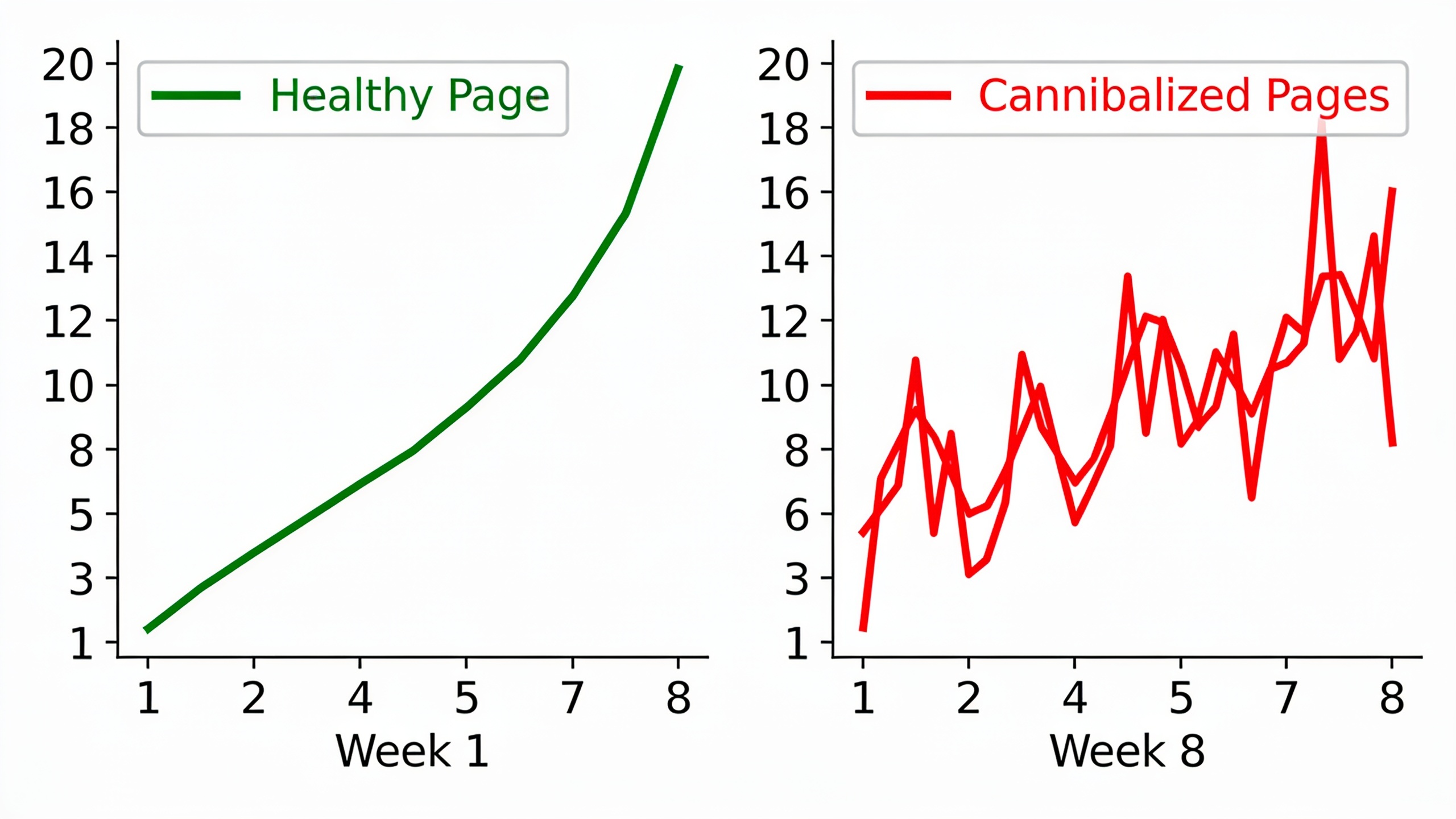
Google's whole job is to serve the single best answer. When two of your pages practically shout the same intent, the algorithm has to guess, and that guess changes week to week as it re-weighs freshness, engagement, and relevance. This is exactly why cannibalized pages bounce around, jumping from position 8 to position 15 for the same query over a few weeks, instead of trending cleanly up or down.
You're Burning Content Hours
Every hour spent writing, editing, and promoting a page that just re-does existing content is an hour you didn't spend covering something genuinely new. It's a sneaky cost. It almost never shows up until someone finally audits the site and discovers a dozen articles all orbiting the same three keywords.
And even when a cannibalized page does manage to rank, it might show up right next to its sibling in the results, which looks weird to searchers and can drag down the combined click-through rate compared to one clean, obviously-relevant result. This kind of quiet drift is worth watching alongside the wider set of 10 SEO KPIs marketers should track every month, because cannibalization usually shows up first as an unexplained dip in average position or CTR, not a dramatic traffic cliff.
How Do You Find Keyword Cannibalization in Google Search Console?
You find keyword cannibalization in Google Search Console by filtering the Performance report by a specific query, then checking the "Pages" tab to see whether more than one of your URLs shows up for it. If two or more pages are pulling impressions for the same term, especially with similar click volumes, you've got competing pages on your hands.
Here's how I run the audit:
- Open the Performance report and set your date range to at least 3 months. You want stable trends, not last Tuesday's noise.
- Sort your queries by impressions to surface the high-volume terms first, since cannibalization matters most on keywords that already bring in real visibility.
- Click into a single query and flip to the "Pages" tab. Two or more URLs with meaningful impressions for that same query? That's your smoking gun.
- Look at the average position for each URL. If both hover in a similar zone (say, positions 9 through 14) and neither ever cracks the top 5, that's Google splitting its confidence between them.
- Export the query-page combos into a spreadsheet so you can spot which URL pairs keep showing up across multiple queries, not just one.
So what does the data actually look like? A page that's cleanly targeting a keyword shows one dominant URL scooping up nearly all the impressions and clicks, with maybe a secondary URL catching a few stray long-tail crumbs. Cannibalization looks messier: impressions get split in a way that doesn't map to genuinely different intents, and each URL's position see-saws as Google keeps changing its mind about which one is more relevant.
| Signal in Search Console | Likely Healthy Page Structure | Likely Cannibalization |
|---|---|---|
| URLs shown per query | One primary URL, occasional long-tail overlap | Two or more URLs with comparable impressions |
| Average position stability | Stable over weeks/months | Swings between positions (e.g., 6 to 18) |
| Click-through rate | Matches expected CTR for that position | Lower than expected for the combined position |
| Query-to-page mapping | Clear 1:1 or 1:many with distinct subtopics | Same core intent, unclear which page "owns" it |
| Impressions trend | Growing or stable for the ranking URL | Split and see-sawing between URLs |
Other Ways to Spot Competing Pages
Beyond Search Console, you can catch competing pages with a mix of a manual site search, a content inventory spreadsheet, and a rank tracker that shows you historical positions for individual URLs. Honestly, using all three together catches stuff any single method misses.
The quickest gut-check is the `site:` operator. Run `site:yourdomain.com "exact phrase"` in Google and see what comes back. If a bunch of your own pages surface for a phrase that should have one obvious answer, it's worth digging into whether those pages are truly different or just doing the same work twice.
Then there's the content inventory, which is just a spreadsheet listing every published URL next to its primary keyword, publish date, and current ranking. Building this out (yes, even by hand on a mid-sized site) makes overlapping targets jump out in a way you'll basically never catch by clicking around your own site. A lot of teams do this as part of a bigger content audit when they're also working on topical authority as an SEO strategy that outperforms simple keyword lists, since mapping every URL to a cluster naturally exposes where two pages have wandered into the same territory.
And rank trackers are great for one specific tell. If you're monitoring a keyword and the ranking URL keeps changing week over week, even though nobody on your team has touched either page, that URL "swapping" on a stable keyword is one of the cleanest fingerprints of cannibalization there is.
Want content like this running on autopilot for your own site? Try RobinRank free — AI-written, SEO-optimized articles generated and published automatically, no credit card required.
How Do You Fix Competing Pages in SEO?
You fix competing pages by picking one of three moves for each cannibalized keyword: merge the pages into one, clearly split them by search intent, or use a canonical tag or redirect to tell search engines which page should rank. Which one you choose depends on whether the pages actually serve different needs or are just repeating the same idea in two places.
Step 1: Make sure it's really cannibalization. Before you touch anything, confirm the pages are genuinely fighting over the same intent and not just covering related-but-different angles. A page on "email marketing best practices" and one on "email subject line examples" both mention email marketing, sure, but they answer different questions. Don't merge them just because they share a word.
Step 2: Decide, merge or split. If both pages are answering the same question in roughly the same way, merging is almost always the right call. If they serve genuinely different intents (informational vs. transactional, beginner vs. advanced, product A vs. product B), then differentiation, sharpening each page's unique angle, keeps the value of both.
Step 3: Consolidate and redirect. To merge, pull the strongest sections from both pages into one comprehensive URL, then set up a 301 redirect from the weaker page to the survivor. That hands over whatever link equity and ranking history the old page built up instead of just tossing it in the bin. And go update every internal link that used to point at the old URL so it points directly at the new one. Don't lean on the redirect alone.
Step 4: Differentiate by sharpening intent. To split them, rewrite the title tag, H1, and opening paragraph of each page so they unmistakably chase different angles. Take a broad "email marketing guide" and carve it into a strategic overview page and a separate, tactical "email subject line examples" page, for instance. Then cross-link the two so both users and search engines get that they're teammates, not rivals.
Step 5: Use canonicals for near-duplicates. Sometimes two pages exist for legit technical reasons, like filtered ecommerce URLs or A/B test variants, but you don't want both indexed. A canonical tag pointing at the preferred version tells Google which URL to treat as the real one, no redirect needed.
Step 6: Rebuild your internal links around the winner. Once you've crowned a page for a keyword, audit your internal linking and funnel your anchor text and links toward that single URL. Internal links are one of the strongest signals you fully control, and concentrating them tells Google, in no uncertain terms, which page matters most.
Step 7: Point external signals at the winner too. After you've consolidated, the surviving page wants as much outside authority aimed at it as you can manage. This is where earning new backlinks to that specific winning URL (instead of letting future links scatter across old or duplicate pages) really pays off. A manually reviewed backlink exchange network, like the one RobinRank runs, can help route fresh, verified placements to the consolidated page rather than diluting your authority further across near-duplicates.
Consolidation vs. Differentiation: Which Fix Should You Choose?
The whole decision boils down to one question: do the competing pages answer the same searcher question, or two related-but-separate ones? Here's how I think about it.
| Factor | Choose Consolidation | Choose Differentiation |
|---|---|---|
| Search intent overlap | Nearly identical | Related but distinct (e.g., beginner vs. advanced) |
| Content quality of both pages | One page is clearly weaker or outdated | Both pages have unique value worth keeping |
| Backlink profile | Links point to both URLs for the same reason | Links point to each page for different reasons |
| Traffic pattern in Search Console | Impressions split for the same exact query | Each page ranks for a distinct query cluster |
| Effort required | Lower — one rewrite, one redirect | Higher — both pages need editing and re-optimizing |
| Risk of future cannibalization | Low once merged | Moderate — requires ongoing monitoring |
How to Prevent Keyword Cannibalization Going Forward
The most reliable way to prevent cannibalization is to plan your content around topic clusters instead of isolated keywords, so every new page has a clear, non-overlapping job before a single word gets written. It flips the whole workflow. You stop asking "what keyword should we target next" and start asking "what gap in our coverage does this page actually fill."
The backbone of this is a keyword map, which is just a living document assigning one primary keyword and intent to each existing and planned URL. Before you greenlight a new article, glance at the map and confirm no existing page already owns that intent. That one habit alone kills off the vast majority of future cannibalization, especially on sites with big content teams or multiple writers doing their own thing.
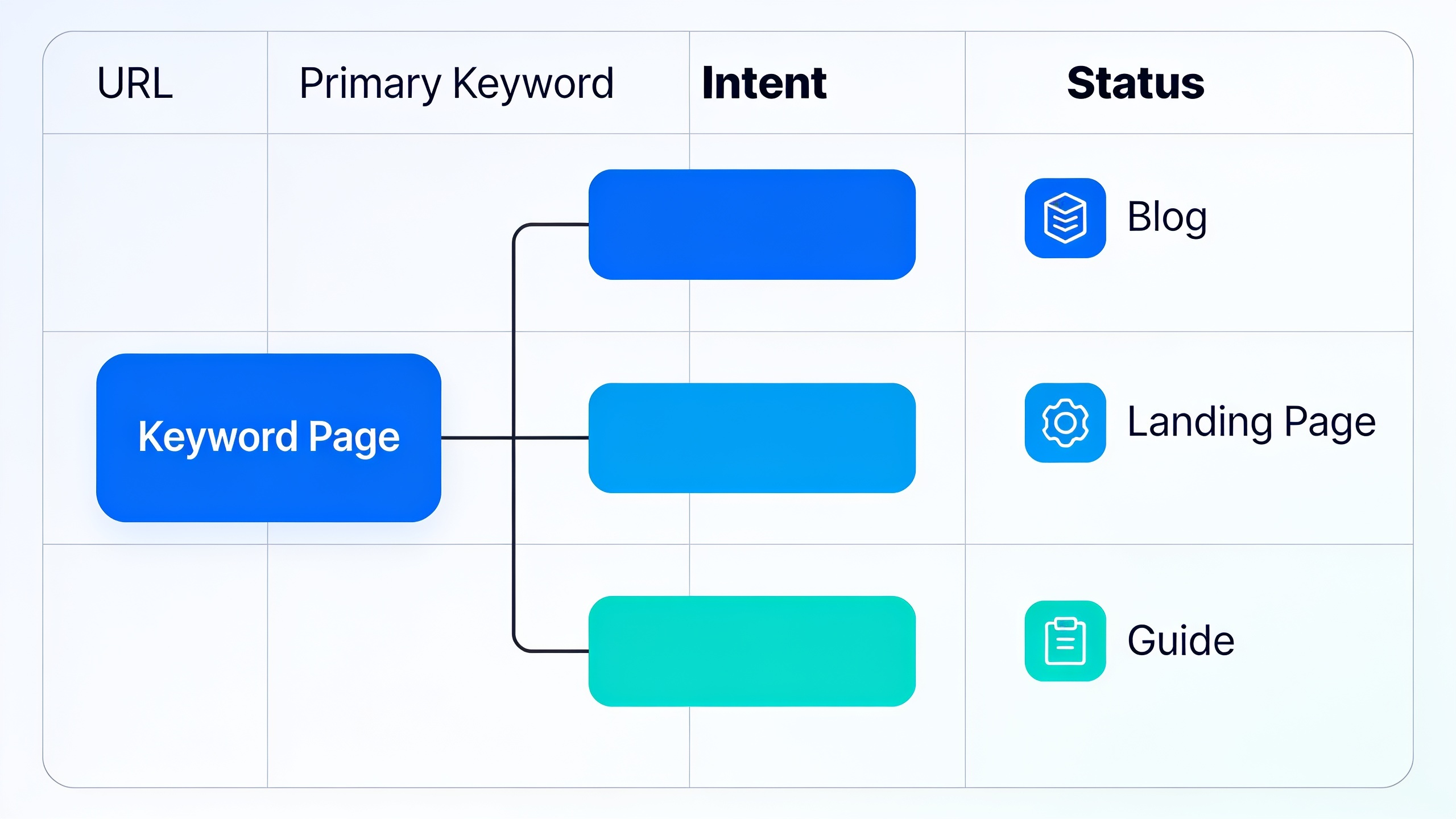
From there, organize content into clusters instead of cranking out standalone articles chasing individual keywords. Build around a pillar page with supporting subtopic pages, each hitting a distinct angle. This structure is the heart of building topical authority as an SEO strategy that outperforms simple keyword lists, because it forces every new piece to earn its spot in the cluster rather than quietly duplicating another page's job.
Set a recurring reminder to re-run that Search Console query-and-pages check. Quarterly is a sensible cadence for most growing sites. Content libraries drift over time (new writers show up, old pages get refreshed, product pages get restructured), so a one-time fix rarely stays fixed without periodic check-ins. Pairing this audit with the ranking and traffic metrics from 10 SEO KPIs marketers should track every month makes it a lot easier to catch a problem while it's still small.
Oh, and one more thing that matters more than people admit: assign clear ownership. On bigger teams, cannibalization creeps in mostly because nobody's actually accountable for knowing what's already been published. Put one content owner (or a shared, genuinely maintained keyword map) in charge of signing off on new topics before drafting starts, and you close that gap.
Frequently Asked Questions
Does keyword cannibalization always hurt rankings, or can it be harmless?
It almost always does some damage, even if the site doesn't lose all its visibility. What usually happens is both cannibalized pages rank in a mediocre range instead of one page ranking strongly, which is a missed opportunity even when traffic doesn't visibly tank. The exception is when the "competing" pages truly serve different intents and just happen to share a keyword. In that case it might not be real cannibalization at all.
How many pages count as cannibalization, and does it need an exact keyword match?
No exact match required. Cannibalization can happen between pages targeting close variants of a keyword if the underlying intent is the same, like "best project management software" versus "top project management tools." The real test isn't the wording. It's whether someone typing either phrase would be equally happy with either page.
Should I just delete a cannibalized page instead of redirecting it?
Redirecting is generally the safer play. A 301 passes along the backlinks and historical authority the old page built up to the surviving URL. Deleting a page cold, with no redirect, throws that equity away and leaves a broken experience for anyone who linked to or bookmarked it.
Can this happen between a blog post and a product or landing page?
Yes, and it's one of the most common flavors of the problem. It shows up when an informational blog post and a commercial landing page both get optimized around the same head keyword. The usual fix is differentiation, not consolidation: keep the blog post on informational intent (how it works, comparisons, tips) and the landing page on commercial intent (pricing, features, CTAs), then link between them so they support each other instead of competing.
How long until I see ranking improvements after fixing cannibalization?
There's no universal timeline. It depends on how fast search engines recrawl and reprocess the affected URLs and how competitive the keyword is. A lot of SEOs report seeing shifts within a few weeks of implementing redirects or consolidating content, but a full re-evaluation by Google can take longer on sites that get crawled less often.
Keyword cannibalization is rarely one big blunder. It's the slow pile-up of small, disconnected content decisions made without a shared map of what already exists. Audit your Search Console data on a schedule, commit to either merging or genuinely differentiating every overlapping pair, and build new content around topic clusters instead of one-off keywords. Do that, and you'll stop your own pages from quietly eating into your own rankings.
Ready to stop writing content by hand? Start your free RobinRank trial and get a full month of SEO-optimized articles published on autopilot.