Site Speed and SEO: How Page Load Time Impacts Rankings
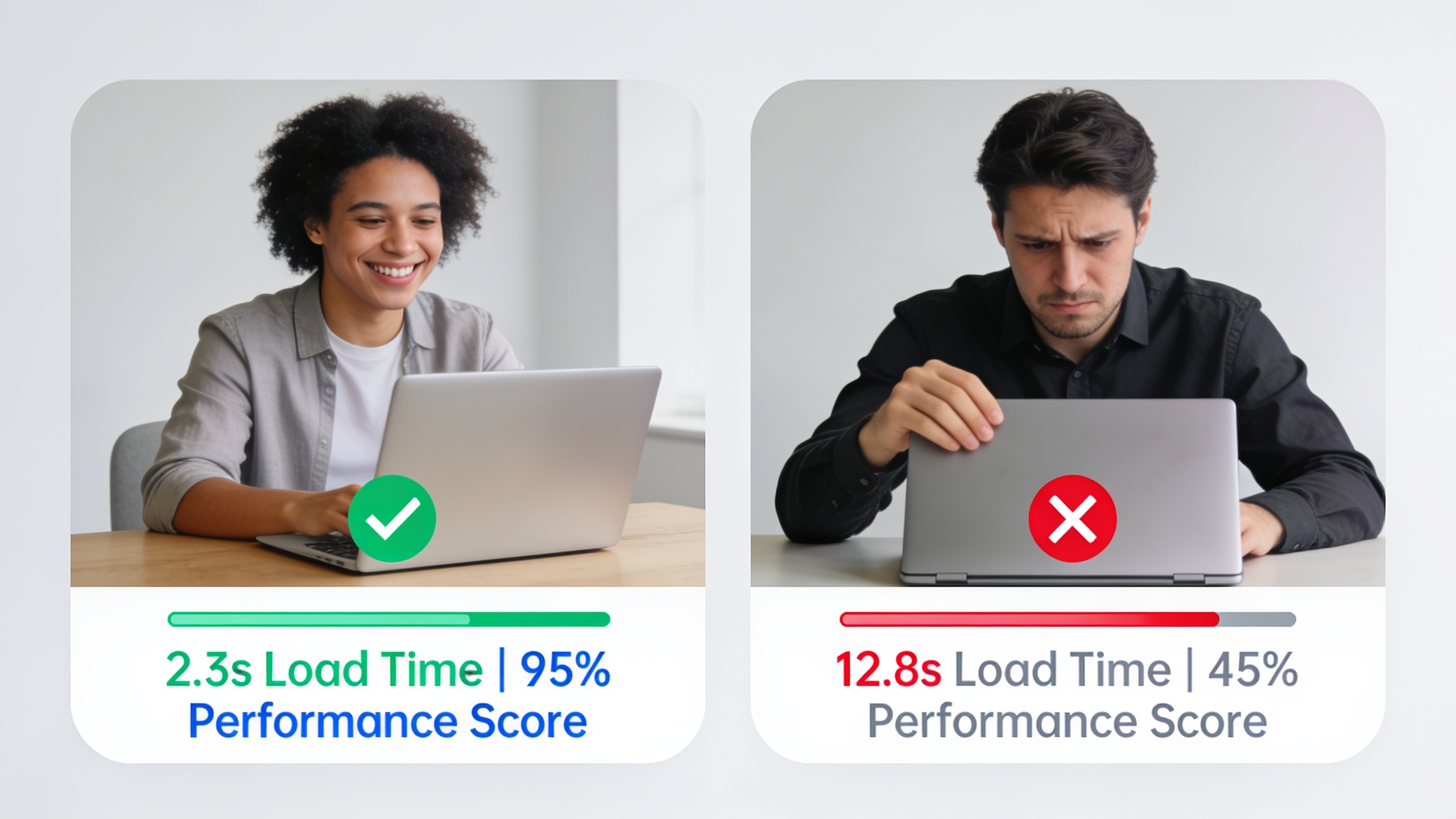
So let's get into what Core Web Vitals actually measure, how much load time really moves the needle on rankings, and the specific fixes that are worth your time versus the ones that aren't.
Table of Contents
- What Is Site Speed SEO and Why Does It Matter?
- What Are Core Web Vitals?
- Does Page Speed Actually Affect Google Rankings?
- How to Measure Site Speed and Core Web Vitals
- Practical Ways to Improve Site Speed SEO
- Mobile Speed: A Different Set of Challenges
- Site Speed SEO and Content Strategy
- Frequently Asked Questions
What Is Site Speed SEO and Why Does It Matter?
Site speed SEO means tuning your site's loading performance so it keeps both Google and actual human beings happy. It matters because slow pages drive up bounce rates, tank engagement, and (since Google's Page Experience update in 2021) send weaker ranking signals tied directly to how fast things load.
For years, speed was treated as an afterthought in SEO circles. Something you'd get around to after the content and backlinks were handled. That attitude is dead. Google has openly baked page experience signals, Core Web Vitals included, into how it ranks pages, which means a slow site is already fighting uphill before a single word of your content even gets read.
And there's a whole behavioral side to this that's honestly harder to argue with. In a widely cited 2017 mobile analysis from Google and SOASTA, researchers found that 53% of mobile site visits were abandoned when pages took longer than three seconds to load. Now, is that exact number still gospel in 2024? Probably not to the decimal. But the underlying truth (people have almost zero patience for slow pages) has held up in basically every study since. When users bail that fast, it feeds weak engagement signals, and that can drag your rankings down even beyond whatever direct speed penalty Google applies.
Here's what really gets me about this. For content-heavy sites, the kind SEO folks and agencies wrestle with every day, it's a compounding problem. You can publish a genuinely excellent, deeply researched article, but if the page under it crawls to load, you're sabotaging your own work before a reader (or a crawler) ever reaches the good stuff.
What Are Core Web Vitals?
Core Web Vitals are three specific performance metrics Google uses to measure loading speed, interactivity, and visual stability from a real user's point of view. They're Largest Contentful Paint (LCP), Interaction to Next Paint (INP), and Cumulative Layout Shift (CLS), and each one has a published threshold for what counts as "good."
Largest Contentful Paint (LCP)
LCP tracks how long it takes for the biggest visible thing on your page (usually a hero image, a banner, or a big chunk of text) to fully render. Per Google's web.dev docs, a good LCP is 2.5 seconds or less. Between 2.5 and 4 seconds you're in "needs improvement" territory, and anything over 4 seconds is just plain "poor."
Interaction to Next Paint (INP)
INP measures how responsive a page feels, meaning how quickly it reacts when someone clicks, taps, or types. It officially took over from First Input Delay (FID) as a Core Web Vital in March 2024, according to Google's Chrome team, because it captures the full lag of an interaction instead of just that first tiny delay. Web.dev's thresholds put a good INP at 200 milliseconds or less. Anything above 500 milliseconds is poor.
Cumulative Layout Shift (CLS)
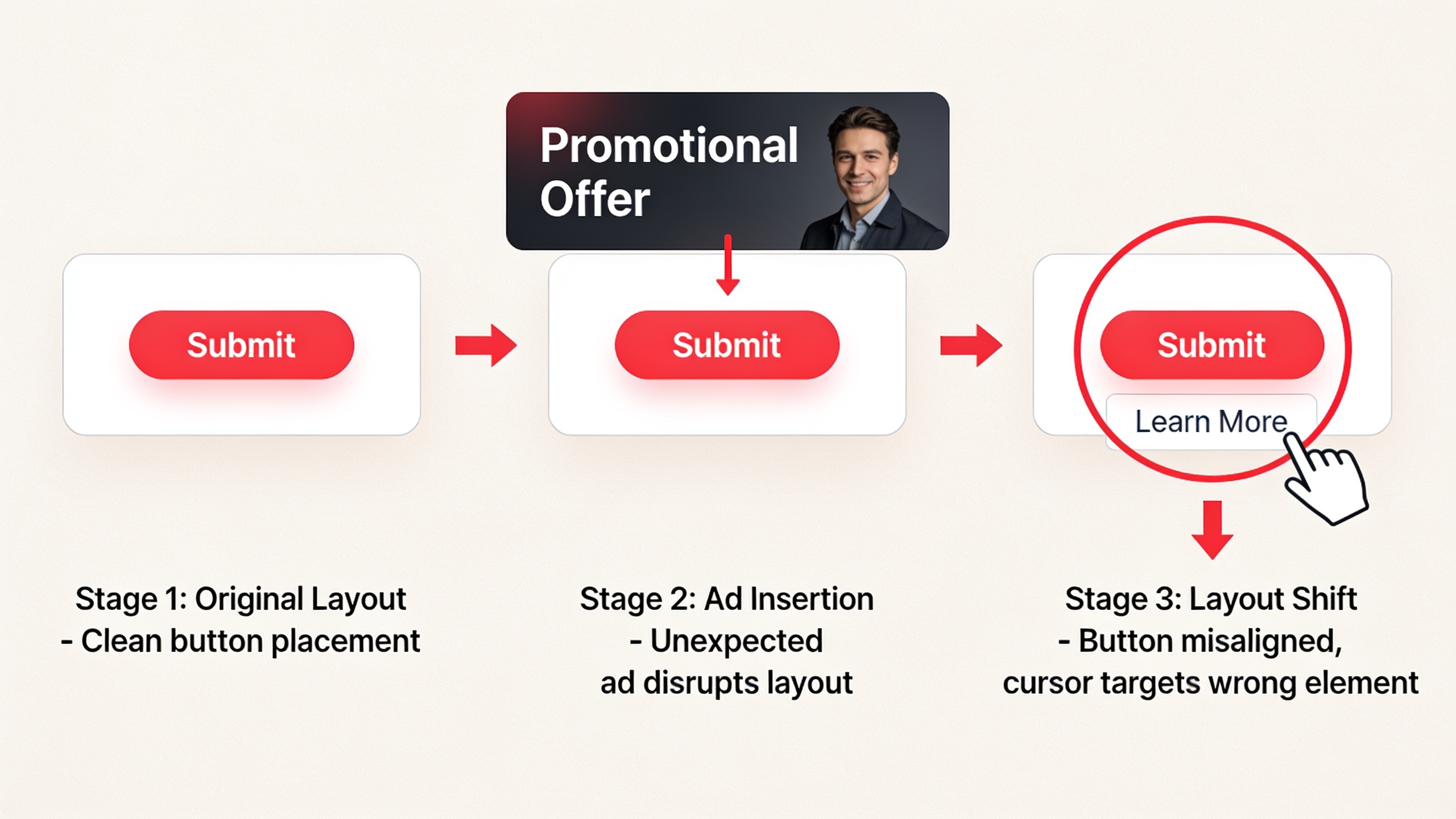
CLS is about visual stability, or basically how much stuff jumps around while your page loads. You know the feeling. You go to tap a button and an ad loads in and shoves it down the screen and suddenly you've clicked something you didn't want. That's a CLS problem. Google's threshold for a good CLS is 0.1 or lower, and above 0.25 is considered poor.
| Core Web Vital | Good | Needs Improvement | Poor |
|---|---|---|---|
| Largest Contentful Paint (LCP) | ≤ 2.5 seconds | 2.5–4.0 seconds | > 4.0 seconds |
| Interaction to Next Paint (INP) | ≤ 200 ms | 200–500 ms | > 500 ms |
| Cumulative Layout Shift (CLS) | ≤ 0.1 | 0.1–0.25 | > 0.25 |
Together these three are what Google calls the "page experience" signals, and they're judged at the URL level using real-world data from actual Chrome users, all bundled up into the Chrome User Experience Report (CrUX).
Does Page Speed Actually Affect Google Rankings?
Yes, page speed and Core Web Vitals are confirmed ranking factors, but Google has said over and over that they work more like a tie-breaker than a hammer. Relevance and content quality still matter way more. Knowing where speed actually sits in the pecking order saves you from pouring weeks into optimization that barely moves anything.
Google folded Core Web Vitals into its "page experience" signals starting June 2021 for desktop, having already done a mobile-focused version the year before. Their own developer docs say page experience is one signal among many, and it's not built to override strong, relevant content from a competitor. In plain English: a page with a slightly slower LCP but genuinely better answers for what someone's searching can absolutely still beat a faster, thinner page.
That said, speed's influence shows up most clearly in a few situations. When two pages are basically neck and neck on relevance and authority, the faster, more stable one wins. On mobile search, where connection quality and device power swing wildly, bad Core Web Vitals scores are more likely to line up with weaker rankings. And in e-commerce or lead-gen, slow speed hammers your conversion rate directly, which hurts the business even when the pure ranking effect is small.
This is also where speed bumps into the rest of your structural SEO work. A site that's already organized around clear topical relevance, say through a deliberate topic cluster strategy that boosts rankings, gets more mileage out of speed improvements, because the content underneath is already set up to compete. Speed amplifies good structure. It doesn't replace it.
How to Measure Site Speed and Core Web Vitals
You measure site speed and Core Web Vitals with a handful of Google's free tools, each of which reports slightly different numbers depending on whether it's using real user data or a simulated lab test. Knowing which tool does what will spare you a lot of head-scratching.
First, the distinction that trips everybody up: field data versus lab data. Field data (sometimes called "real user monitoring" or RUM) comes from actual visits by real Chrome users, and it's what Google uses for ranking. Lab data is generated by simulating a page load under fixed network and device conditions. Great for debugging, but it's not what determines your Core Web Vitals status in the eyes of the algorithm.
As for the tools themselves, here's what you'll actually reach for:
- Google Search Console's Core Web Vitals report shows field data grouped by URL, flagging pages as Good, Needs Improvement, or Poor.
- PageSpeed Insights mixes field data (when it's available) with a lab test from a single run, and throws in specific recommendations.
- Chrome UX Report (CrUX) is the public dataset of real-world data that powers both of the above.
- Lighthouse is a lab-based auditing tool baked into Chrome DevTools, handy for testing changes before they go live.
A workflow that works for most teams: peek at the Core Web Vitals report in Search Console once a month to catch problems at scale, then break out PageSpeed Insights and Lighthouse for page-by-page detective work whenever a URL group slides into "Needs Improvement" or "Poor."
Practical Ways to Improve Site Speed SEO
Improving site speed SEO really comes down to one thing: making the browser do less work before your page shows up and becomes usable. Smaller files, fewer render-blocking resources, faster server responses. These are the fixes that tend to actually show up in your LCP, INP, and CLS numbers.
Want content like this running on autopilot for your own site? Try RobinRank free — AI-written, SEO-optimized articles generated and published automatically, no credit card required.
Images and media are the usual suspect. Big, unoptimized images are one of the most common reasons for a bad LCP, especially when that huge hero image is the largest element on the page. Convert your images to modern formats like WebP or AVIF, which squeeze down much smaller than JPEG or PNG. Serve responsive sizes so someone on a phone isn't downloading a desktop-sized file for no reason. Lazy-load anything below the fold so it's not fighting your important content for bandwidth during the initial load. And set explicit width and height attributes on images and embeds, which stops layout shifts (good for CLS) while everything loads in.
Render-blocking resources are the next big one. CSS and JavaScript files that have to fully load before the browser can paint anything are a classic bottleneck. Defer or asynchronously load the non-critical JavaScript, inline the critical CSS you need for above-the-fold content while loading the rest async, and minify and bundle your CSS and JS to cut down both the number of requests and the total size.
Then there's server response and hosting, which people forget about because it's invisible. A slow Time to First Byte (TTFB) delays literally everything downstream, LCP included. A content delivery network (CDN) helps by serving assets from servers physically closer to your visitors. Server-side caching means repeat visits (and crawler visits) don't rebuild the page from scratch every single time. And honestly, if your TTFB keeps blowing past 600 milliseconds (a rough benchmark a lot of performance engineers use), it might just be time to upgrade the hosting.
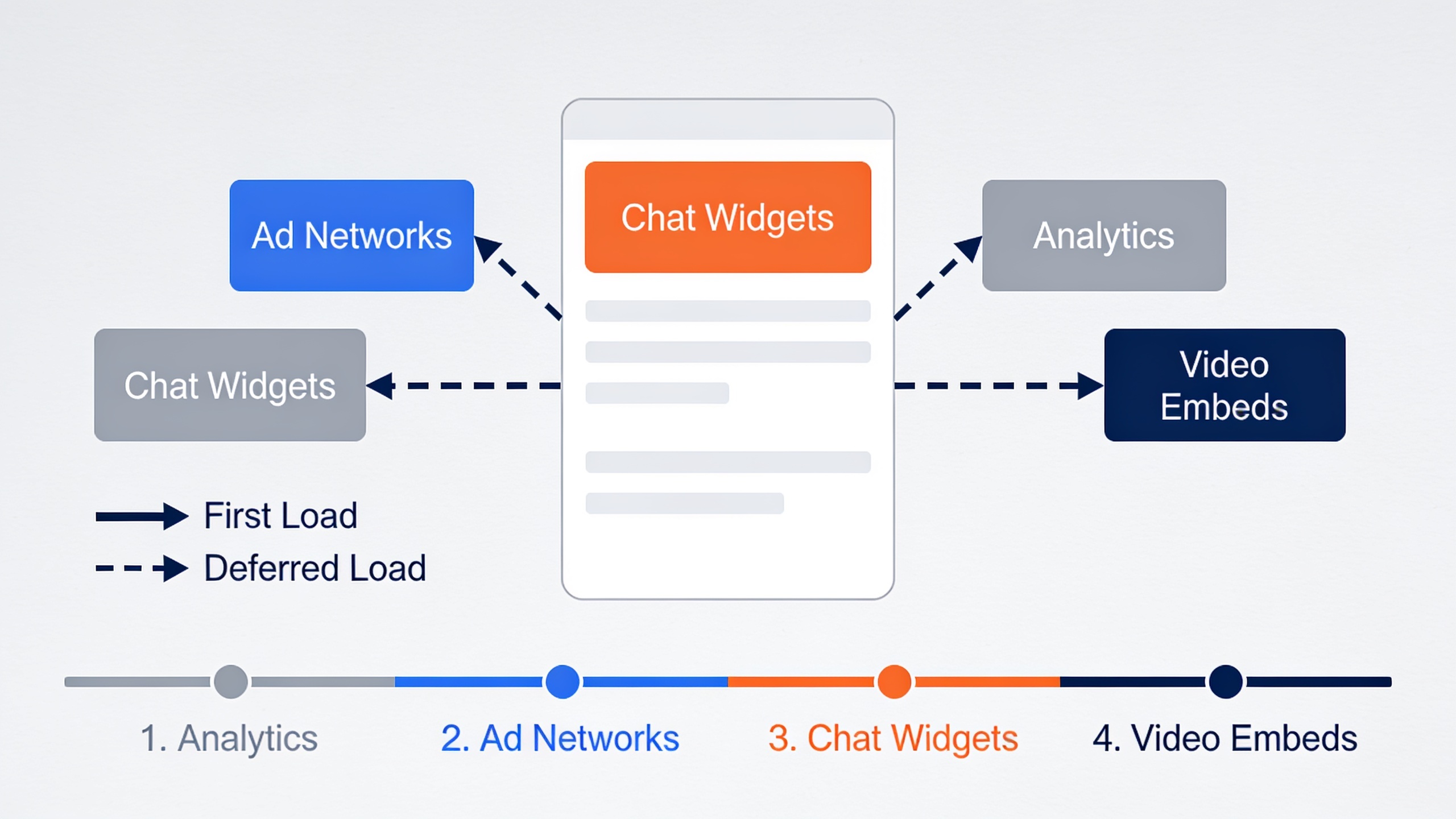
Third-party scripts deserve their own rant. Ad networks, chat widgets, analytics tags, embedded videos. Each one drags along its own loading and execution overhead, and they're frequently the biggest hidden culprit behind bad INP scores because they run JavaScript you don't fully control. Audit them regularly and kill the ones that no longer earn their keep. Load the non-essential ones after your main content has rendered. And for heavy embeds, use a facade pattern, like a static thumbnail that only loads the actual video embed when someone clicks it.
Last thing on this front: layout stability. Beyond sizing your images right, stop injecting content (cookie banners, promo bars, ads) above existing content after the page has already started drawing. Reserve space for that stuff in the layout from the beginning so nothing jumps when it shows up. Your visitors' misclicked buttons will thank you.
Mobile Speed: A Different Set of Challenges
Mobile site speed needs its own attention, because Google collects Core Web Vitals data mostly from real mobile and desktop Chrome sessions, and mobile devices are generally stuck with slower processors and flakier networks than desktops. And since Google has run mobile-first indexing as its default since 2019, the mobile version of your page is basically the version being judged for rankings in the vast majority of cases.
Which means a site that feels lightning-fast on a developer's beefy desktop, tested over cushy office Wi-Fi, can still be a slog for your average visitor on a mid-range phone riding 4G. That gap catches so many teams off guard.
A few mobile-specific moves actually help. Test with Chrome DevTools' network throttling to fake a slower connection instead of trusting your fast local network. Trim your JavaScript execution time, since mobile CPUs chew through scripts a lot slower than desktop ones. And prioritize getting above-the-fold content out first on small viewports, where less is visible up top and every millisecond of delay feels more painful.
Since so much organic traffic now comes in through mobile search, treating mobile performance as your main benchmark (not a footnote after desktop testing) is one of the more dependable ways to protect your rankings under how Google actually evaluates things today.
Site Speed SEO and Content Strategy
Site speed doesn't work in a vacuum. It plays alongside content structure, internal linking, and topical relevance to decide how a page ultimately does in search. A blazing-fast page stuffed with thin, disorganized content still flops. And a beautifully written, semantically rich page loses a chunk of its edge if it takes forever to load.
That's why I'd treat speed optimization as one layer of a bigger technical-and-content strategy, not some standalone crusade. If your content strategy already leans on the ideas in what semantic SEO is and why it matters for modern rankings, then pairing that semantic depth with a fast, stable page gives search engines (and increasingly, AI answer engines) fewer excuses to skip over you. Those systems, and the AI assistants pulling from indexed pages, tend to favor sources that are both genuinely useful and technically easy to access.
For teams cranking out content at scale, this means performance should live on the publishing checklist, not in some audit that happens six months later when things are already broken. Platforms that automate article writing and publishing, including RobinRank's own workflow for producing and pushing SEO-optimized articles straight to a connected CMS, work best when the site underneath is already fast and stable. The content and the technical foundation have to pull in the same direction, not against each other.
Balancing Speed Work Against Other SEO Priorities
Not every site needs to chase a flawless Core Web Vitals score before spending another dime on content. Here's a rough way to think about what to fix first:
| Situation | Recommended Focus |
|---|---|
| Search Console shows most URLs as "Poor" for Core Web Vitals | Prioritize technical speed fixes before scaling content production |
| Core Web Vitals are "Good" but organic traffic is flat | Focus on content depth, topical coverage, and internal linking |
| Mixed results across templates (e.g., blog fast, product pages slow) | Fix the underperforming template first, since it likely affects many URLs at once |
| Core Web Vitals are "Good" and content coverage is strong | Shift focus to backlinks, distribution, and content freshness |
This kind of triage stops you from obsessing over marginal speed gains while ignoring bigger content or structural holes. Or, just as bad, dumping more content on top of a foundation that's technically falling apart.
Frequently Asked Questions
Does site speed matter more than content quality for SEO?
No. Google has said page experience signals, Core Web Vitals included, aren't built to override strong, relevant content. Speed acts more like a tie-breaker between pages that are already similar in relevance and quality, so content depth and topical coverage generally matter more than shaving off a few hundred milliseconds.
What actually counts as a good Core Web Vitals score?
Per Google's web.dev docs, a good score means LCP at or under 2.5 seconds, INP at or under 200 milliseconds, and CLS at or under 0.1. And you have to hit all three to earn a "Good" overall status in tools like Search Console. Miss one and you're not there yet.
How do I check my site's Core Web Vitals?
Use Google Search Console's Core Web Vitals report for real-world field data grouped by URL, or PageSpeed Insights for a per-page check that blends field data with a lab test. Both are free and both pull from the same Chrome User Experience Report dataset underneath.
Did INP really replace FID?
Yep. According to Google's Chrome team, Interaction to Next Paint (INP) officially took over from First Input Delay (FID) as a Core Web Vital in March 2024, because it measures the full latency of interactions across a page's whole lifecycle, not just the lag before the very first response.
Can slow speed hurt my rankings even if Google calls it a minor factor?
Indirectly, yeah. Even where the direct algorithmic weight is small, slow pages tend to produce higher bounce rates and weaker engagement, and that can reinforce poor performance signals over time, totally separate from any explicit Core Web Vitals effect.
Site speed SEO isn't a one-and-done fix. It's an ongoing part of keeping a healthy, competitive site alive. Core Web Vitals hand you a concrete, measurable target to aim at, but the real payoff comes when you stop treating speed, content structure, and topical relevance as three separate projects fighting for your attention and start treating them as one system.
Ready to stop writing content by hand? Start your free RobinRank trial and get a full month of SEO-optimized articles published on autopilot.