Technical SEO Audit: A Step-by-Step Checklist for Marketers
So this is the checklist. The actual steps that SEO pros, content marketers, founders, and agencies use to figure out what's dragging a site down, from crawl issues all the way through Core Web Vitals. Let's get into it.
Table of Contents
- What Is a Technical SEO Audit and Why Does It Matter?
- Step 1: Check Crawlability
- Step 2: Review Indexing Status
- Step 3: Evaluate Site Architecture and Internal Linking
- Step 4: Test Page Speed and Core Web Vitals
- Step 5: Audit Structured Data and Schema Markup
- Step 6: Check Mobile Usability and Security
- How Often Should You Run a Technical SEO Audit?
- Technical SEO Audit Tools Comparison
- Frequently Asked Questions
What Is a Technical SEO Audit and Why Does It Matter?
A technical SEO audit is the process of digging into the backend and infrastructure of a website (crawl paths, indexation, server response, page speed, structured data, mobile rendering) to find the barriers stopping search engines from accessing and ranking your content. A content audit asks "are we writing about the right things?" A technical audit asks something more basic and more brutal: can Google even reach and understand any of this in the first place?
And this matters more than people think, because search engines don't have infinite patience. They allocate a limited amount of resources to crawling any given site, which folks in the industry call "crawl budget." Waste that budget on broken links, duplicate URLs, and endless redirect chains, and your important pages get crawled less often or, worst case, skipped entirely. Google's own Search Central docs have said this over and over: a page has to be crawlable and indexable before ranking factors like content quality or backlinks even enter the conversation.
If you don't have a dedicated technical SEO person on staff (most teams don't), running a structured checklist on a schedule is honestly your best defense. Quarterly works for most sites, monthly if you're a big e-commerce shop or a publisher pumping out content daily. A single audit usually turns up problems across six areas: crawlability, indexing, architecture, performance, structured data, and mobile/security. That's the order we're going through them.
Step 1: Check Crawlability
Crawlability is a search engine's ability to access and read your pages using bots like Googlebot. If a page is blocked from crawling, the content on it might as well not exist. Doesn't matter if it's the best thing you've ever written.
Review Your Robots.txt File
Your robots.txt file lives at the root of your domain (yoursite.com/robots.txt) and tells crawlers which parts of the site they can and can't visit. Here's where things go sideways: someone accidentally blocks an entire staging environment, or worse, leaves a stray `Disallow: /` line hanging around from development and nukes the whole live site. I've seen it happen. It's ugly. So every audit should start by literally opening this file and reading it, making sure nothing important (blog, product pages, categories) is getting blocked by mistake.
Check for Crawl Errors
Crawl errors pop up when a bot tries to hit a URL and gets a failure back, like a 404 (not found) or a 500 (server error). Google Search Console's Crawl Stats report will show you these, and so will third-party crawlers like Screaming Frog or Sitebulb if you want to see them at scale. A few things worth obsessing over:
- Broken internal links pointing to pages you deleted or moved
- Redirect chains, where a URL redirects to a URL that redirects again (every hop adds delay and bleeds link equity)
- Server errors (5xx) that spike during traffic surges or after you push a deployment
Audit Your XML Sitemap
Your XML sitemap is basically a list of the URLs you actually want search engines to find. During an audit, make sure it only contains canonical, indexable URLs. No redirected pages, no 404s, no duplicate junk. A sitemap stuffed with low-value URLs muddies the signal you're trying to send about which pages actually matter. Keep it clean.
Step 2: Review Indexing Status
Indexing is how search engines store and organize the content they've crawled so it can show up in results. And here's the annoying part: a page can be perfectly crawlable and still never get indexed, because Google decided it's low-value, or it's a duplicate, or someone slapped a "noindex" tag on it by accident.
Use the Index Coverage Report
Google Search Console's Index Coverage report (they sometimes call it "Pages") shows you exactly how many URLs are indexed versus excluded, plus the reason for each exclusion. You'll see categories like "Discovered – currently not indexed," "Crawled – currently not indexed," and "Duplicate without user-selected canonical." If you spot a big jump in excluded pages, drop everything and investigate. That kind of spike usually means either a technical block or Google's algorithm quietly deciding your content isn't worth the storage space.
Check Meta Robots Tags and Canonical Tags
A meta robots tag with a "noindex" directive tells search engines to keep a page out of the index, even if they can crawl it. Perfectly useful for thin pages like internal search results or filtered category pages. The problem is these tags love to sneak in during site migrations or CMS updates and end up on pages that absolutely should be indexed. Same deal with canonical tags, which point to the "preferred" version of a page when you've got duplicates floating around. Check them for consistency. A self-referencing canonical should point to itself, and a cross-page canonical should point to the real preferred URL, not some outdated or random one nobody meant to reference.
Watch for Duplicate Content
Duplicate content happens when the same (or nearly the same) content is reachable through multiple URLs. With and without a trailing slash, with tracking parameters tacked on, across HTTP and HTTPS versions, that kind of thing. The issue is it splits your ranking signals across all those URLs instead of piling them onto one. Fixing this with proper canonicalization or 301 redirects is genuinely one of the highest-leverage moves on this whole list, because you're consolidating authority that was previously spread way too thin.
Step 3: Evaluate Site Architecture and Internal Linking
Site architecture is how your pages are organized and linked together, the structural hierarchy that both people and search engines use to get around. A logical, shallow layout helps search engines figure out which pages matter most and how everything connects.
Aim for a Flat Structure
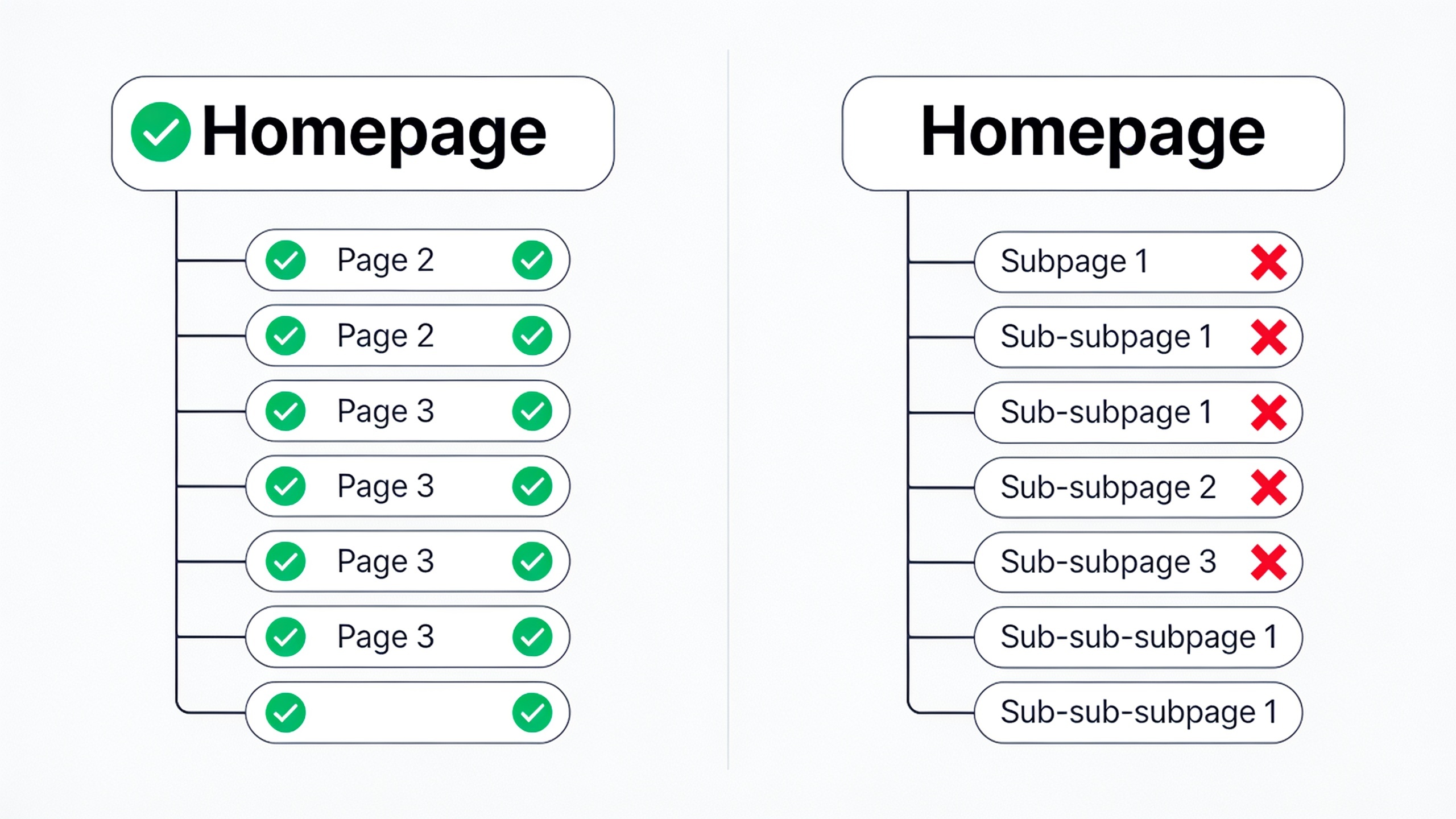
A flat structure means your important pages are reachable in three clicks or fewer from the homepage. Bury a product or article five or six levels deep in nested categories and you make life hard for crawlers, plus you dilute how much internal link equity trickles down to those pages. E-commerce sites are the worst offenders here, with their sprawling category-subcategory-filter mazes. If you've ever tried to click your way to a specific product on some giant retail site and given up, you know exactly what I mean.
Strengthen Internal Linking
Internal links are the hyperlinks connecting one page on your site to another. They do two jobs: helping people navigate to related stuff, and helping search engines understand which pages are related and which ones are important. A smart internal linking setup usually clusters related content together. For instance, a cluster of local business content might link out to something like Local SEO for Small Businesses: A Beginner's Roadmap, which reinforces topical relevance for readers and crawlers alike. While you're auditing, hunt down orphan pages, the ones with zero internal links pointing at them. They're basically invisible to crawlers unless they happen to be in your sitemap.
Optimize URL Structure
Clean, descriptive URLs (like /blog/technical-seo-audit instead of /page?id=4821) are just easier for everyone to read, humans and bots both. Flag anything with excessive parameters, session IDs, or inconsistent casing during your audit, since that stuff tends to breed the exact duplicate content problems we just talked about in Step 2.
Step 4: Test Page Speed and Core Web Vitals
Page speed and Core Web Vitals measure how fast a page loads and how stable and responsive it feels to an actual person, and they're confirmed ranking signals under Google's page experience update. A slow, janky page doesn't just annoy visitors. It can genuinely hold your rankings back even when the content is great.
Understand the Three Core Web Vitals Metrics
Google's Core Web Vitals boil down to three metrics:
- Largest Contentful Paint (LCP) tracks how long it takes for the biggest visible element on the page to render. Google wants this to happen within 2.5 seconds of the page starting to load.
- Interaction to Next Paint (INP) measures how quickly the page responds when someone clicks or taps. Google recommends keeping INP under 200 milliseconds. (INP officially replaced First Input Delay as a Core Web Vital in March 2024, per Google's Chrome Developers documentation.)
- Cumulative Layout Shift (CLS) is about visual stability, or how much stuff jumps around as the page loads. You want a CLS score under 0.1. If you've ever gone to tap a button and had an ad shove it out of the way at the last second, congrats, you've experienced bad CLS.
Want content like this running on autopilot for your own site? Try RobinRank free — AI-written, SEO-optimized articles generated and published automatically, no credit card required.
Run the Tests
PageSpeed Insights and the Core Web Vitals report in Search Console are your two most direct sources here. PageSpeed Insights is nice because it blends lab data (simulated tests) with real-world field data pulled from actual Chrome users via the Chrome User Experience Report. Test mobile and desktop separately, always. Mobile scores are usually worse, and mobile is what Google primarily uses for ranking anyway under mobile-first indexing, so don't skip it.
Common Fixes
Most of the performance problems you'll dig up come down to a handful of usual suspects: unoptimized images that need compressing and resizing, bloated JavaScript that should be deferred or removed, browser caching that isn't enabled, assets that would load faster through a CDN, and render-blocking resources gumming up the `
` of your pages. None of these are glamorous fixes. All of them help.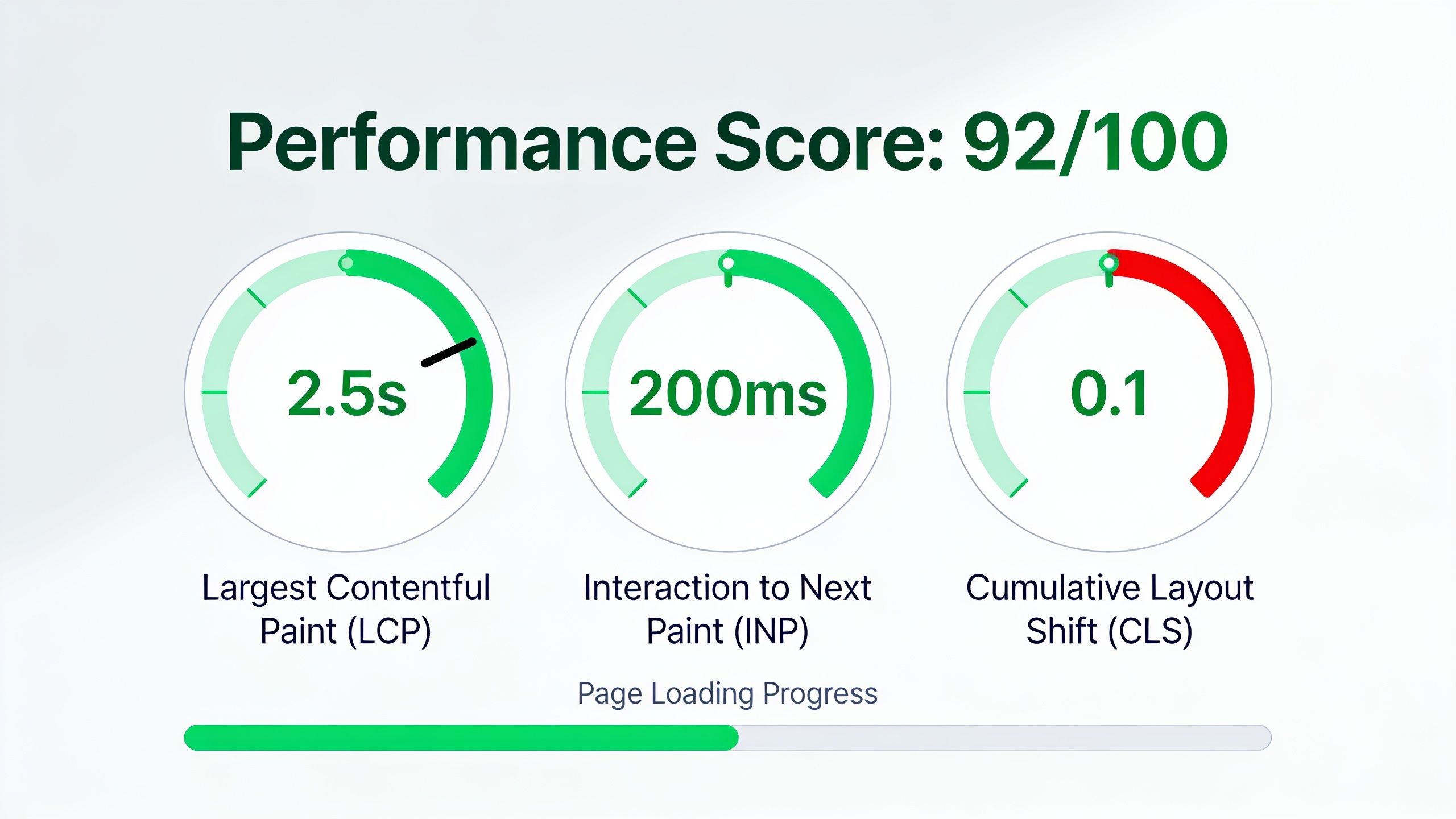
Step 5: Audit Structured Data and Schema Markup
Structured data is standardized code (usually JSON-LD) added to a page's HTML that spells out exactly what the content is to search engines. Marking up a recipe's ingredients, a product's price, an article's author and publish date, stuff like that. It doesn't directly boost your rankings, so don't expect miracles. What it does is unlock rich results (star ratings, FAQ dropdowns, breadcrumbs in the search results) and those can seriously improve your click-through rate.
Validate Existing Markup
Google's Rich Results Test and the Schema Markup Validator both check whether the structured data on a page is formatted correctly and eligible for rich results. When you audit, keep an eye out for markup that references content that isn't even on the page anymore (a super common leftover from redesigns) or schema types that have been deprecated. Old markup rotting on a page helps nobody.
Prioritize High-Impact Schema Types
Not all schema is created equal. Article, Product, Review, FAQPage, BreadcrumbList, and Organization schema tend to have the most visible payoff for typical marketing and e-commerce sites, so start there. And if your content is built around answering direct questions, structured data plays really nicely with going after featured snippets. There's a deeper dive on that in Featured Snippets 101: How to Win Position Zero, which breaks down how answer-formatted content and clean markup team up to land you those prime spots.
Step 6: Check Mobile Usability and Security
Mobile usability and site security are the foundational trust and accessibility signals that shape both how people experience your site and whether search engines treat it as fully crawlable and rankable.
Confirm Mobile-First Indexing Readiness
Mobile-first indexing means Google mostly uses the mobile version of your content for indexing and ranking, and Google confirmed this applies to basically every site in its index as of its 2023–2024 documentation updates. So during your audit, make sure the mobile version of every important page has the same content, links, and structured data as the desktop version. Mismatches here are sneaky. Older "responsive" themes love to hide content on mobile, which can quietly yank important stuff out of what Google actually indexes without you ever noticing.
Verify HTTPS Implementation
HTTPS is the encrypted version of HTTP, and Google's counted it as a lightweight ranking signal since 2014. Your audit should confirm every page redirects properly from HTTP to HTTPS, that there are no mixed-content warnings (secure pages loading insecure resources), and that your SSL certificate is valid and not about to expire on you. Expired certs are the kind of thing that takes down a site on a Sunday morning when nobody's watching.
Check for Intrusive Interstitials
Google's page experience guidelines flag intrusive interstitials (pop-ups that slam over your main content the second the page loads, especially on mobile) as a negative signal. Legally required stuff like cookie consent banners generally gets a pass. But those "SUBSCRIBE NOW" promo pop-ups covering everything? Those can hurt your usability scores and your rankings. Nobody likes them anyway.
How Often Should You Run a Technical SEO Audit?
Most sites should run a full technical SEO audit quarterly, with lighter monitoring ticking along in the background through automated alerts in tools like Google Search Console. If you're running something big and constantly changing, like an e-commerce platform with thousands of SKUs or a publisher shipping dozens of articles a day, go monthly. New pages mean new chances for crawl, indexing, or duplication issues to creep in.
Smaller sites that don't add many pages can usually get away with a proper deep audit twice a year, as long as they've got ongoing monitoring set up for the high-risk stuff: crawl errors, indexing drops, and Core Web Vitals sliding backward. The real point is to stop thinking of an audit as a one-and-done cleanup and start treating it as a maintenance habit. Technical issues accumulate quietly. A broken redirect here, an accidental noindex there, and before you know it they've compounded into a traffic decline you didn't see coming.
Technical SEO Audit Tools Comparison
Which tools you reach for depends on your site size, your budget, and whether you need ongoing monitoring or just a one-time deep crawl. Here's a rundown of the main categories of technical SEO tools and what each one's actually good for.
| Tool Category | Example Tools | Best For | Typical Cost Structure |
|---|---|---|---|
| Search engine consoles | Google Search Console, Bing Webmaster Tools | Indexing status, Core Web Vitals, crawl stats | Free |
| Desktop/cloud crawlers | Screaming Frog, Sitebulb | Full-site crawl audits, broken links, redirect chains | Free tier + paid tiers |
| All-in-one SEO suites | Ahrefs, Semrush | Combining technical audits with keyword and backlink data | Paid subscription |
| Performance testing | PageSpeed Insights, WebPageTest | Core Web Vitals and load-time diagnostics | Free |
| Structured data validation | Rich Results Test, Schema Markup Validator | Verifying schema markup eligibility | Free |
One caveat: pricing and features shift around constantly, so check each tool's official site for current plans before you commit any budget.
Frequently Asked Questions
So what's the actual difference between a technical SEO audit and an on-page SEO audit?
A technical audit is about whether search engines can crawl, index, and render your site properly. Server response codes, XML sitemaps, Core Web Vitals, that layer. An on-page audit zooms in on content-level things: keyword usage, title tags, heading structure on individual pages. You need both. But the technical audit usually comes first, because all that lovely content optimization is wasted effort if the page can't get indexed in the first place.
How long does a technical SEO audit actually take?
Depends a lot on how big the site is. A small business site with under 100 pages might take you a few hours to a day using Screaming Frog plus Search Console. A big e-commerce or enterprise site with tens of thousands of URLs? That can stretch to several days or even a few weeks if you're doing it right, especially once you start cross-referencing crawl data against server logs.
Can I run one myself without hiring a specialist?
Yeah, especially for small to mid-sized sites. Free tools like Google Search Console, PageSpeed Insights, and the free crawl limits in Screaming Frog cover most of the checklist above just fine. That said, once you're dealing with JavaScript-heavy frameworks, multiple international versions, or a giant product catalog, a specialist who can read crawl logs and diagnose rendering issues the generic tools miss becomes worth the money. Know your limits.
What are the most common problems these audits turn up?
The same handful, honestly. Accidental noindex tags left over from staging, orphaned pages with no internal links, duplicate content from URL parameters, slow LCP scores caused by images nobody bothered to compress, and broken internal links after a redesign or CMS migration. The good news is most of these get fixed within days once you spot them, which is exactly why running regular audits matters. You catch them while they're still cheap.
Does publishing new content help fix technical SEO problems?
No, and this is a trap people fall into. Content and technical health solve completely different problems. Writing great, well-optimized content (including keeping up a steady technical SEO checklist routine) helps with topical coverage and relevance. It won't touch an underlying crawl block, a broken sitemap, or a sluggish server. You have to fix both for organic growth to actually compound. It's one reason content-publishing platforms like RobinRank work best when they're paired with a technically solid site, not used to paper over a broken one.
Look, a technical SEO audit is never going to be the highlight of your week. But it's the line between content that gets a fair shot at ranking and content that's quietly invisible to search engines, which is a much worse place to be. Work through crawlability, indexing, architecture, performance, structured data, and mobile/security in that order and you've got a repeatable checklist to come back to every quarter. Catch the small stuff early, before it turns into a traffic problem you only notice when it's already too late.
Ready to stop writing content by hand? Start your free RobinRank trial and get a full month of SEO-optimized articles published on autopilot.