The Complete Guide to Building SEO Pillar Pages That Convert
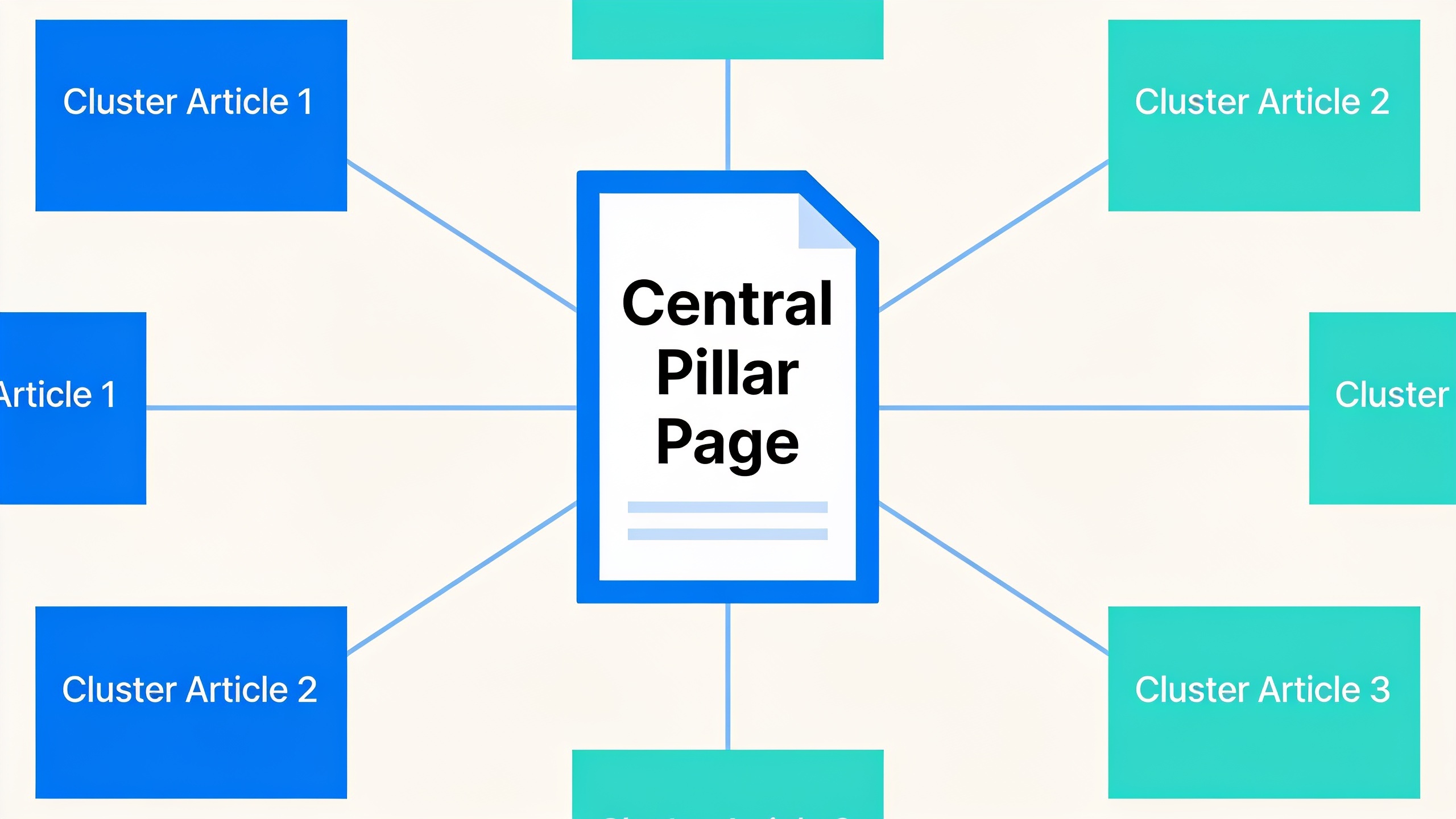
So this guide covers what pillar pages actually are, why they work, and how to put one together without the whole thing falling apart. Research, outline, internal linking, on-page SEO, the conversion stuff. All of it.
Table of Contents
- What Is a Pillar Page? Defining Pillar Pages SEO Basics
- How Pillar Pages Support a Content Pillar Strategy
- Why Pillar Pages SEO Strategy Outperforms Standalone Blog Posts
- How to Structure a Pillar Page for Maximum Pillar Pages SEO Visibility
- Building the Cluster: Linking Subtopic Content to Your Pillar
- Turning Pillar Pages Into Lead Generation Assets
- Building Authority and Backlinks Around Your Pillar Content
- Common Mistakes That Sink Pillar Pages
- FAQ: Pillar Pages and Content Pillar Strategy
What Is a Pillar Page? Defining Pillar Pages SEO Basics
A pillar page is a single, comprehensive page that covers a broad topic deeply enough to be the go-to resource on that subject for your site, while linking out to more specific articles that each dig into one piece of it. The old hub-and-spoke analogy works fine here. The pillar answers the big question ("What is content marketing?") and the spokes handle the smaller ones ("How to write a content brief," "How often should you actually publish?").
This whole idea goes back to the "topic cluster" framework HubSpot pushed hard around 2017. The thinking was that search engines had stopped rewarding individual keyword-stuffed pages and started rewarding sites that showed real, comprehensive coverage of a subject. A typical pillar page runs 2,000 to 4,000+ words, targets a broad high-volume keyword (usually a competitive head term with strong intent), and gets organized into clean H2/H3 sections that map to the cluster articles hanging off it.
And no, a pillar page is not the same thing as a long blog post, even though people mix them up constantly. A blog post answers one question and moves on. A pillar page is doing double duty. It's trying to rank on its own and acting as a kind of traffic controller for a whole family of related content underneath it.
How Pillar Pages Support a Content Pillar Strategy
A content pillar strategy is the bigger editorial plan that sorts your site's content into topic clusters, each one anchored by a pillar page with a set of supporting articles linking back to it. Think of the pillar page as the thing you ship, and the content pillar strategy as the planning work that decides which pillars exist in the first place, what belongs under each one, and how everything connects.
In practice you start by mapping your core business topics. Usually somewhere between 4 and 8 broad themes that actually matter to your audience and your product. Then you do keyword research to surface the long-tail questions people are asking inside each theme. Say you sell project management software. One pillar might be "Project Management for Remote Teams," with cluster articles on async communication tools, remote onboarding checklists, wrangling time zones, and remote team KPIs.
The real payoff? It stops content sprawl before it starts. Instead of publishing a bunch of orphaned blog posts that quietly compete with each other for attention and links, every piece has a home under a pillar, and every pillar props up your authority on one specific theme. Search engines can crawl a tightly linked cluster way more efficiently than a random pile of unrelated posts. That structural clarity is a big chunk of why a well-run content pillar strategy tends to leave scattershot blogging in the dust over time.
Why Pillar Pages SEO Strategy Outperforms Standalone Blog Posts
A pillar pages SEO strategy beats a bunch of standalone blog posts because it concentrates topical relevance, internal links, and dwell time onto one URL instead of spreading them thin across dozens of disconnected pages. Google doesn't just judge individual pages anymore. It looks at how coherent your coverage of a subject is overall. And Google's Search Quality Rater Guidelines flat-out reward expertise, experience, authoritativeness, and trustworthiness (E-E-A-T), which is a lot easier to pull off when your content is organized and interlinked instead of floating around solo.
There's a practical crawl argument too. Google's own guidance on crawl budget points out that sites with clear, logical link structures make it easier for crawlers to find and prioritize the pages that matter. A pillar page with a dozen-plus contextual links pointing to cluster content basically hands Google a map: here's the parent page for this topic, here are the kids. A stack of unlinked blog posts can't say that about itself.
Then there's the Helpful Content Update, which first rolled out in 2022. Since then Google has leaned harder on content written to genuinely help a searcher rather than content engineered to game rankings. A pillar page that fully answers a broad question and then routes you to deeper resources for your specific follow-ups fits that "helpful" standard almost perfectly, because that's how an actual knowledgeable human explains things. Start broad. Go deep where it's needed.
Oh, and one more thing that quietly matters a lot: pillar pages tend to pull in backlinks better than narrow how-to posts. People link to comprehensive resources, not to your 700-word "how to name a Slack channel" post. That concentration of link equity on one URL, plus solid internal linking, is often the whole difference between a pillar that lands on page one and one that sits stuck on page three wondering what went wrong.
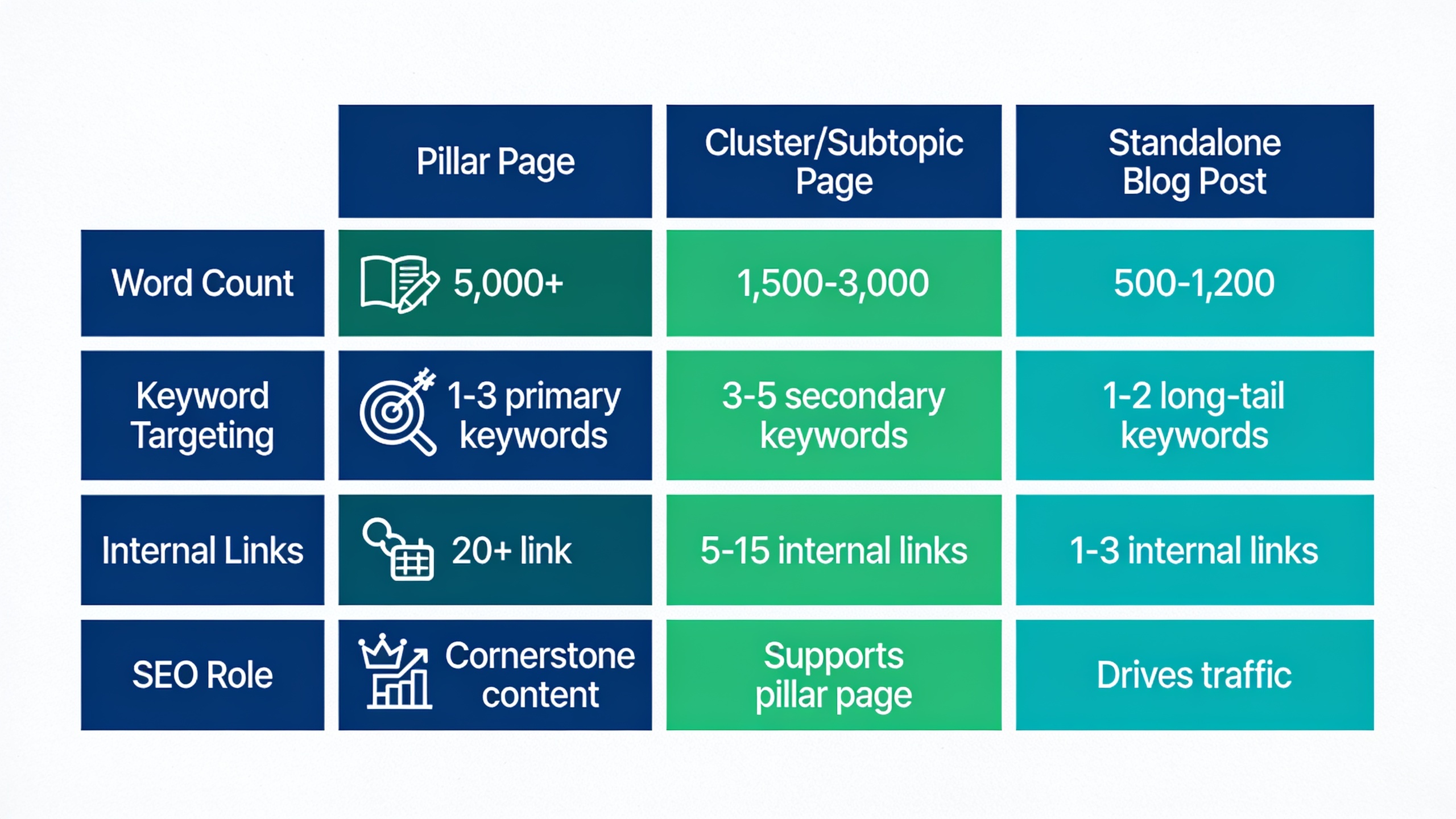
| Attribute | Pillar Page | Cluster/Subtopic Page | Standalone Blog Post |
|---|---|---|---|
| Typical word count | 2,000–4,000+ | 800–1,800 | 600–1,500 |
| Keyword targeting | Broad, high-volume "head" term | Specific long-tail question | Usually one narrow query |
| Internal links | Links out to every cluster article | Links back to pillar + siblings | Often isolated or loosely linked |
| Update frequency | Reviewed/refreshed regularly | Updated as needed | Often published once and forgotten |
| Primary SEO role | Topical authority hub | Long-tail traffic capture | Incremental traffic |
| Conversion role | Central lead-gen asset (CTAs, gated offers) | Secondary CTAs, nurtures toward pillar | Varies, often minimal |
How to Structure a Pillar Page for Maximum Pillar Pages SEO Visibility
The best pillar pages open with a clear definition of the topic, move through a logical run of H2 sections that mirror the questions a reader would naturally ask next, and close with links to every cluster article plus a conversion path. Structure matters at least as much as word count here. A 3,500-word pillar with a messy outline will lose to a tight 2,200-word page that's organized cleanly. Every time.
Step 1: Choose one broad, high-intent topic
Pick something broad enough to support 6 to 15 subtopics but specific enough to map to one clear intent. "SEO" is way too broad for a single pillar. "Technical SEO for E-Commerce Sites" works.
Step 2: Map the subtopic cluster before you write
List every question, comparison, and how-to a reader would need to fully get the topic. Each one becomes a candidate for its own cluster article that'll eventually link back to the pillar. This is also where your content pillar strategy actually gets built. You're deciding up front which content belongs to this pillar and which belongs somewhere else.
Step 3: Build the outline around real search intent, not just keyword volume
Use actual search queries to shape your H2s and H3s. "People Also Ask," autocomplete, whatever keyword tool you like. Each major H2 should stand on its own as a useful answer, because both readers and AI answer engines (Google's AI Overviews, ChatGPT, the whole lot) love to yank a single section out of context and quote it.
Step 4: Write the page so each section is self-contained
Open every section with a direct, complete answer in the first sentence or two, then add the nuance and examples and data. This isn't just tidy writing. It's increasingly how content gets surfaced in AI answers, where a model might grab one paragraph with zero surrounding context and run with it.
Step 5: Add a strong on-page SEO layer
Get the primary keyword into the H1, the first 100 words, the URL slug, and at least one image alt attribute. Use descriptive H2/H3s that fold in natural keyword variations instead of hammering the exact phrase over and over. Write a meta description that states the page's core promise in under 160 characters. And add schema markup (Article or FAQPage) where it makes sense, so search engines can actually parse how the content is structured.
Step 6: Design for skimmability
Pillar pages are long on purpose, so a sticky table of contents, jump links, and short paragraphs matter way more here than on a normal post. Readers and AI crawlers should be able to hit the exact section they want without scrolling through the whole thing first.
If you don't have a full content team to run all six steps consistently (most people don't), this is one spot where a tool like RobinRank, an AI-powered SEO tool that writes, optimizes, and publishes articles automatically, can help keep structure and keyword coverage steady across a growing cluster without you outlining every single page by hand.
Want content like this running on autopilot for your own site? Try RobinRank free — AI-written, SEO-optimized articles generated and published automatically, no credit card required.
Building the Cluster: Linking Subtopic Content to Your Pillar
The cluster is the set of narrower articles that each target one subtopic and link back to the pillar, and honestly, the linking pattern between them is what creates the SEO benefit. Not the pillar existing. The links. Every cluster article should link to the pillar with descriptive anchor text, and the pillar should link out to every cluster article from inside the relevant section of its outline. Two-way relationship, not a one-directional list.
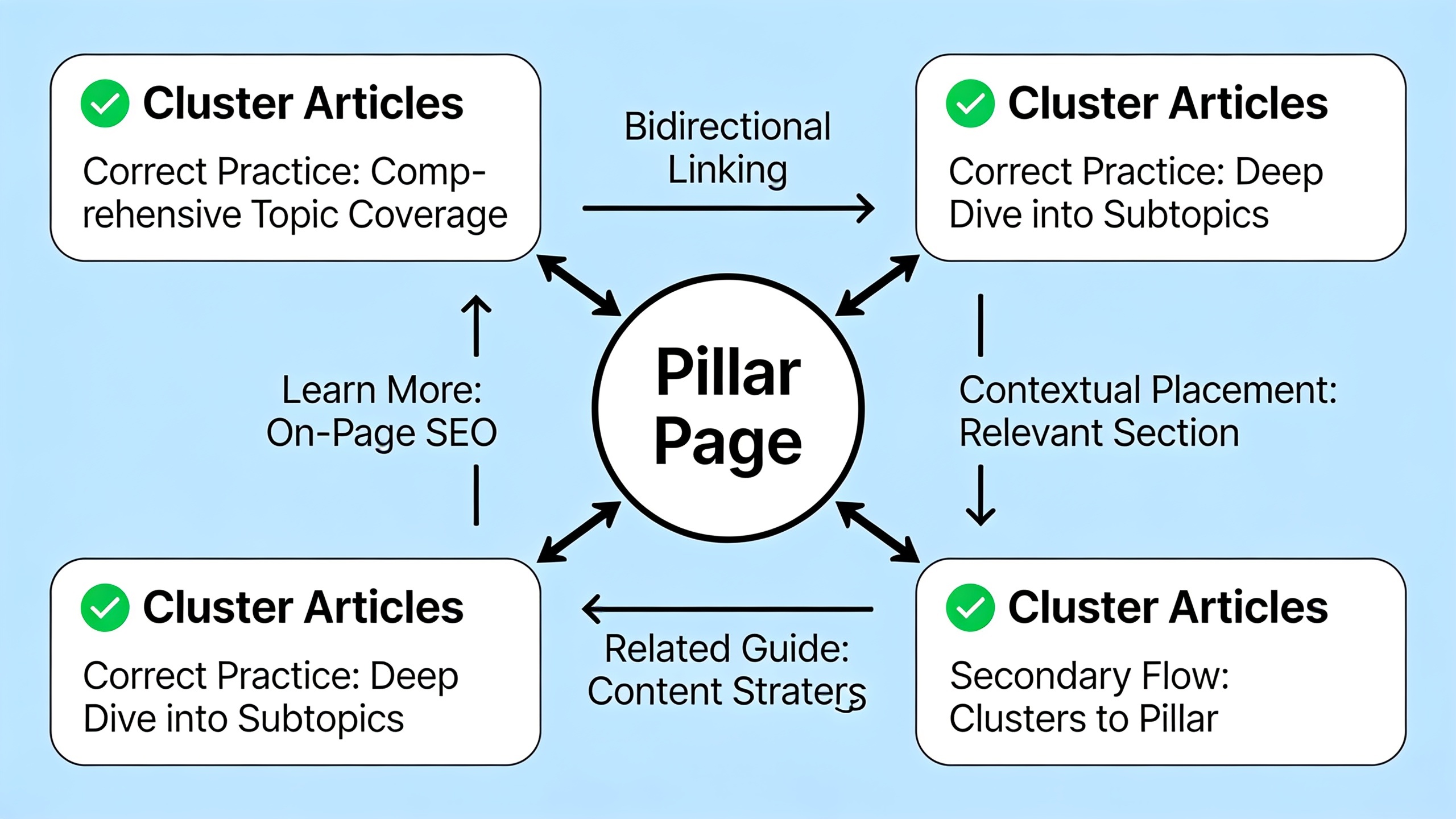
This is where internal linking stops being an afterthought and becomes the actual engine. Publishing a pillar and a few subtopic posts isn't enough. The links between them need to be deliberate, contextual, and dropped where a reader would genuinely want to click deeper. There's a lot more on this in this internal linking strategy guide, but the short version is that internal links spread authority around your site and give search engines a much clearer picture of which pages matter most. A pillar-and-cluster setup is one of the most concrete ways to actually pull that lever.
A few rules I'd stick to for cluster linking:
- Every cluster article links to the pillar at least once, ideally in the first two or three paragraphs.
- The pillar links to each cluster article from the specific section that introduces that subtopic, not dumped into some generic "related articles" box at the bottom where nobody clicks.
- Cluster articles can link to each other when there's a real topical connection (a "content calendar templates" post pointing to a "how often should you publish" post inside the same marketing pillar, for example).
- Don't link a cluster article to more than one pillar unless the overlap is genuinely substantial. You'll just dilute the signal.
If you're planning to scale a cluster out to dozens or hundreds of subtopic pages (super common in e-commerce, local service businesses, or SaaS companies chasing a ton of use cases), it's worth getting your head around programmatic SEO as a complementary way to generate large volumes of templated subtopic pages that still funnel back to one central pillar.
Turning Pillar Pages Into Lead Generation Assets
A pillar page generates leads when its topical authority is paired with a clear, low-friction conversion path that matches where the reader actually is in their decision, not just when it racks up traffic. Pillar pages pull people in early in their research (they're searching a broad topic, not a branded or "buy now" term), so your offer has to match that stage. Educational. Not a sales pitch dressed up as an article.
The conversion stuff that works well on pillar pages usually looks like a relevant lead magnet, something like a downloadable checklist, template, or extended guide that goes deeper than the page itself, sitting behind an email capture. You want contextual CTAs placed mid-page too, not just top and bottom, because most people won't scroll a 3,000-word page in full. They'll convert from whichever section answered their specific question. A soft product mention works where it fits naturally, connecting the topic to how your tool solves the underlying problem, as long as you don't derail the educational vibe of the page. And a plain old newsletter signup catches the readers who aren't ready for a bigger offer but want to keep hearing from you.
The cluster articles pitch in here too. Each subtopic post can nudge a reader who's further along back toward the pillar's main offer, since by that point they've shown deeper interest through multiple page views. This is one of the seriously underrated benefits of a properly built content pillar strategy. It doesn't just organize content for search engines. It quietly builds a nurture path for actual humans.
Building Authority and Backlinks Around Your Pillar Content
Backlinks strengthen a pillar page because they signal to search engines that other sites treat it as a trustworthy reference, and pillar pages are generally easier to earn links to than narrow posts because they're comprehensive enough to cite as a source. So treat the pillar as your main link-earning asset within a topic and actively chase placements that point to it, rather than spreading your outreach evenly across every page in the cluster. That's how the equity concentrates.
Earning those links usually comes down to two paths. There's organic outreach, where you pitch the pillar as a resource to sites already writing about the topic. And there's structured link exchange, where you connect directly with other site owners to trade relevant placements. RobinRank's backlink exchange network takes that second route. Instead of cold emailing strangers, you browse a directory of manually reviewed sites (each one needs a minimum Domain Rating of 5 or higher via Ahrefs), request a placement on a specific page with a specific anchor, and offer a reciprocal link back when it makes sense. Every site gets reviewed by hand before it's listed, no PBNs or link farms allowed, and once a placement goes live the platform crawls the page to confirm the href is actually there. There are weekly checks after that too, so if a link vanishes later, it gets flagged.
For a pillar page specifically, this kind of targeted exchange is handy because you can hunt for sites in a relevant niche and request the placement land right on your pillar's URL with anchor text that reflects the broad topic. Way better than hoping a general campaign happens to drop links on the right page by luck.
Common Mistakes That Sink Pillar Pages
Most pillar pages flop not because the topic was wrong but because the execution skipped one of a few predictable steps. The classic one is writing the pillar in isolation, before the cluster exists, which means there's nothing to link to and the page ends up weirdly thin despite being long. The second most common is picking a topic so broad it can't possibly be covered on one page. "Marketing" or "Business Growth" aren't pillars. They're entire content strategies.
The other errors I see over and over:
- Treating the pillar as a one-and-done project. Search intent and competitor content shift, so pillars need regular review and updates, especially in fast-moving industries.
- Getting lazy with internal linking. Publishing a pillar and a cluster without deliberately cross-linking them throws away most of the structural benefit the whole model is supposed to deliver. This one drives me nuts because it's so avoidable.
- Cramming the page full of CTAs. A pillar that reads like a landing page instead of a genuine resource loses the trust that made it link-worthy in the first place.
- Skipping keyword research on the subtopics. If your cluster articles don't map to real queries, the pillar has nothing meaningful to link out to and the whole structure collapses into one long post with a table of contents bolted on.
- Forgetting mobile and skimmability. Long pages that aren't broken into clear, jump-linked sections lose readers, and they lose the AI answer engines that favor cleanly segmented content when they're generating summaries.
FAQ: Pillar Pages and Content Pillar Strategy
How long should a pillar page actually be?
There's no hard rule, but most effective pillar pages land between 2,000 and 4,000+ words, because they need enough depth to justify linking out to a full cluster. What matters more than the exact number is whether every section pulls its weight instead of padding for length.
How many cluster articles does a pillar page need?
Most content pillar strategies pair a pillar with somewhere between 6 and 15 cluster articles, though bigger topics in competitive spaces can support more. The right number depends on how many distinct, search-worthy subtopics genuinely exist under the pillar. Don't invent a cluster article just to hit a quota.
Do I really need to update pillar pages after publishing?
Yep. Because pillars target broad, competitive topics, both competitor content and search intent keep evolving, so periodically checking the page for outdated info, missing subtopics, or new cluster links is what keeps it ranking rather than slowly sliding into irrelevance.
What's the difference between a pillar page and a landing page?
A pillar page is mostly educational and built to rank for a broad informational keyword. A landing page is built around a single commercial goal with minimal supporting content. A pillar can include conversion elements, sure, but its core job is to answer a topic comprehensively. A landing page's core job is to get you to do one specific thing.
Can a pillar page work without a full cluster built out yet?
It can rank on its own if it's genuinely comprehensive, but it won't deliver the full benefit of the pillar-and-cluster model until subtopic articles exist to link to and from it. Loads of teams publish the pillar first and then build the cluster out over the following weeks or months, updating the pillar's internal links as each new piece goes live.
At the end of it, building a pillar page is less about hitting some word count and more about organizing what you already know into a structure that readers and search engines can both navigate with confidence. Nail the topic mapping, the internal linking, and the cluster relationships, and the SEO benefits start compounding as you add more subtopic content. Meanwhile the conversion elements quietly do the work of turning all that traffic into something the business can actually use.
Ready to stop writing content by hand? Start your free RobinRank trial and get a full month of SEO-optimized articles published on autopilot.